


eCommerce companies are more than just online storefronts - they’re operational machines juggling inventory, logistics, and customer experience, often under tight margin pressure. Running a profitable eCommerce operation that will adapt as you scale requires sturdy eCommerce apps that can rise to the challenge.
While off-the-shelf eCommerce apps are a great place to start, being easy-to-launch and covering most use cases well, they’re designed for a generic, imaginary business, not your business. Apps like Shopify, BigCommerce, and Wix optimize for selling, not operating. They prioritize breadth over depth, and they struggle when you need customized workflows, internal tools, or operational visibility.
As eCommerce businesses scale, the complexity of running day-to-day operations grows faster than most teams anticipate. The result is operational friction that slows teams down right when volume and customer expectations are increasing.
Most of these challenges show up across four core operational areas:
- Overall operational overview
- Returns and Refunds
- Analytics
- Customer Support
- Education
- Healthcare
- Media
Why build eCommerce apps on Retool?
eCommerce teams need flexible internal tools that bring all these areas into a single, shared view.
Where traditional app development can take months and years, Retool simplifies the repetitive parts, allowing developers to move much faster to build a product that is fully bespoke to your needs, and that scales.
Retool’s combination of pre-built elements and the full flexibility of code means you don’t face the same limitations as other low-code platforms, nor the rigidity of SaaS functionality. You can build tools that grow with you, without getting stumped by an inaccessible price tag or hitting the low-code ‘wall’.
Read our full What is Retool guide to learn more about the platform.
Bold Tech’s eCommerce UI template
Our app template is built to show you how quickly you can create a custom tool to solve these problems.
This template provides a blueprint from which you can build something that exactly meets your company’s needs, whether it’s managing stock, inventory tracking, delivery systems or product analysis with the view to finding gaps in the market. See this template as a springboard, inspiration, and an invitation to collaborate with us on building apps that work for you.
Overview - tracking and reorder dashboard
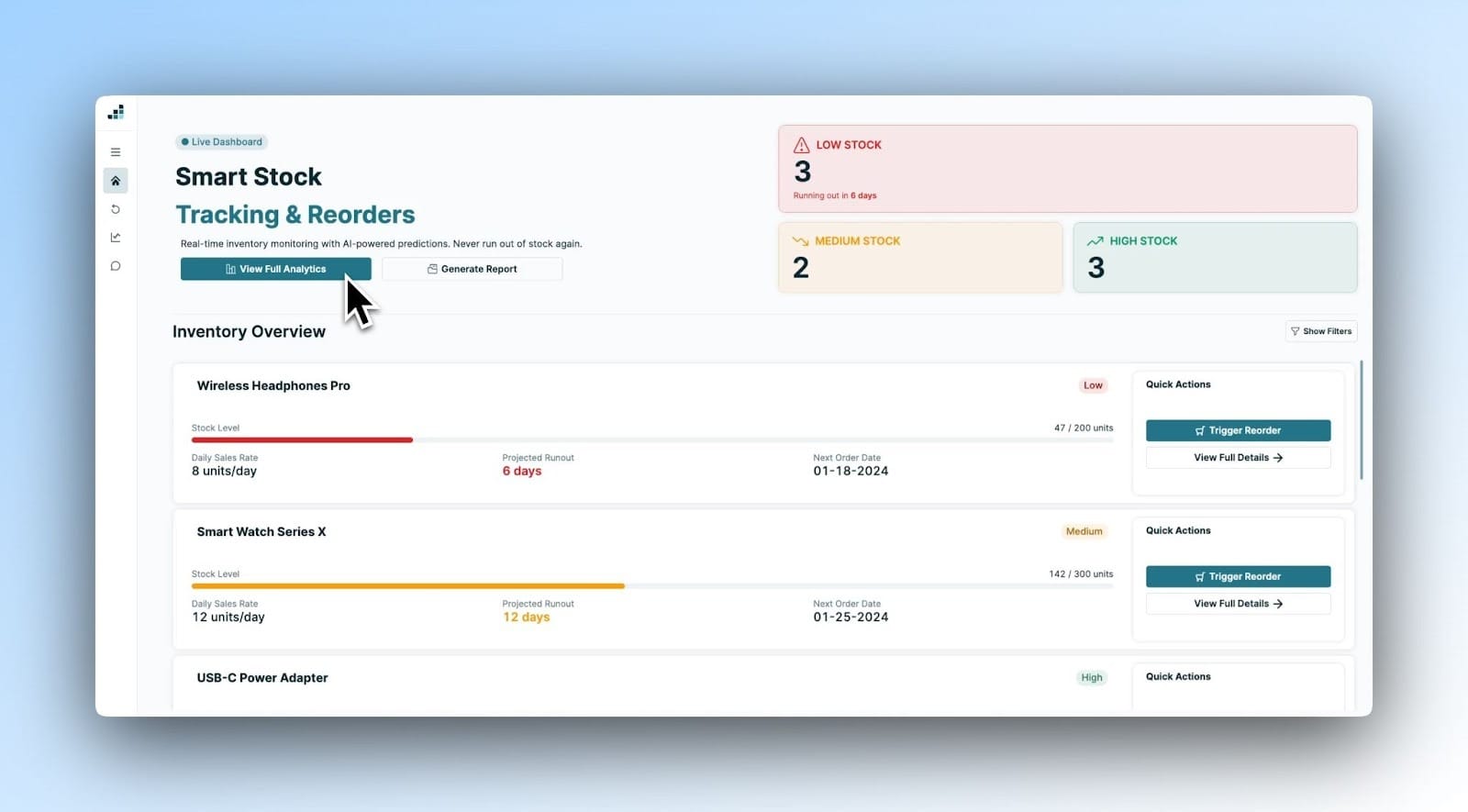
Teams need a clear, real-time picture of what’s happening across orders, shipping, and fulfillment. Answering simple questions like which orders are delayed, which shipments need attention, or where issues are starting to pile up can require jumping between multiple tools or manually stitching together information. Without a reliable overview, teams end up reacting to problems after customers have already been impacted.
Having that instant visibility of the most important information - whether it’s stock levels or inventory details - is paramount for informing the high-priority actions that need to take place next. We built these features with this in mind:
- We chose to provide an instant, visual overview of stock levels on the top right of the app’s ‘overview section’.
- The inventory overview allows you to filter by ‘status’, ‘stock levels’, ‘start-end date’, and includes a search bar where you can search for specific items; all of this is designed so your teams find the information they need as quickly and easily as possible.
- Within each inventory item’s panel overview, you can see how many sales are being made per day on average, the projected runout, plus when the next order date is coming up. This enables you to be proactive in keeping on top of stock maintenance and action appropriately.
- The quick actions next to each item make this next step intuitive, for example, you could ‘trigger reorder’ if the stocks are getting low, or navigate to ‘more details’.
- We’ve also added an analytics feature which allows you to engage with relevant data in a way that is stock, inventory, and operations-focused, and ultimately informs how you manage your team.
Returns and Refunds that are simple to navigate
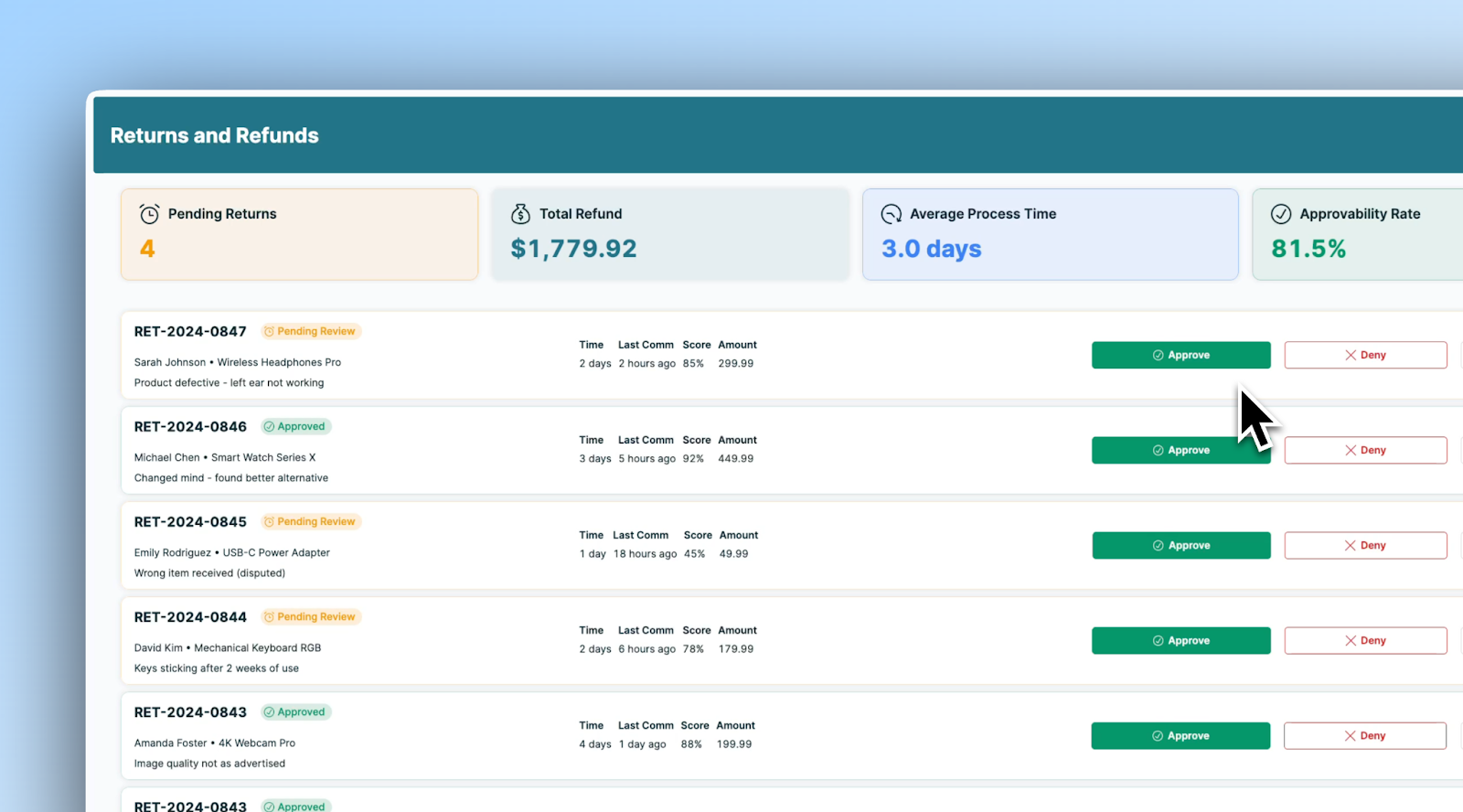
Returns and refunds can be a major source of operational strain. In short, they’re a headache. As order volume grows, returns and exchanges become harder to manage, especially when they’re handled through disconnected systems or manual processes. Teams struggle to track return status, identify bottlenecks, and understand how returns are affecting inventory and revenue. What should be a routine workflow often turns into a time-consuming exception-handling process that pulls attention away from higher-impact work.
At the top of our app, we provide you with a snapshot into the most important headlines you need to be aware of. We recognize the challenge of balancing processing efficiency and keeping an eye on margins and customer satisfaction that is so central to eCommerce companies’ operations. Again, it’s important that the key information displayed on your dashboard serves your company-specific strategy and targets; these headlines can be adapted to meet those.
Below the overview panel, we included individual panels for specific returns, complete with all the information you’d need to be able to decide which action is needed next as well as the possibility of taking quick action there and then to ‘approve’ or ‘deny’ the request.
Not only does this streamline your processes, having all the tickets readily available in the list view gives you a sense of what your team is working on, how efficiently they’re processing requests, and where you may need to redirect your resources. In your own app, you could change the key information shown on the ticket to meet your specific needs and products.
Analytics that drive your decisions
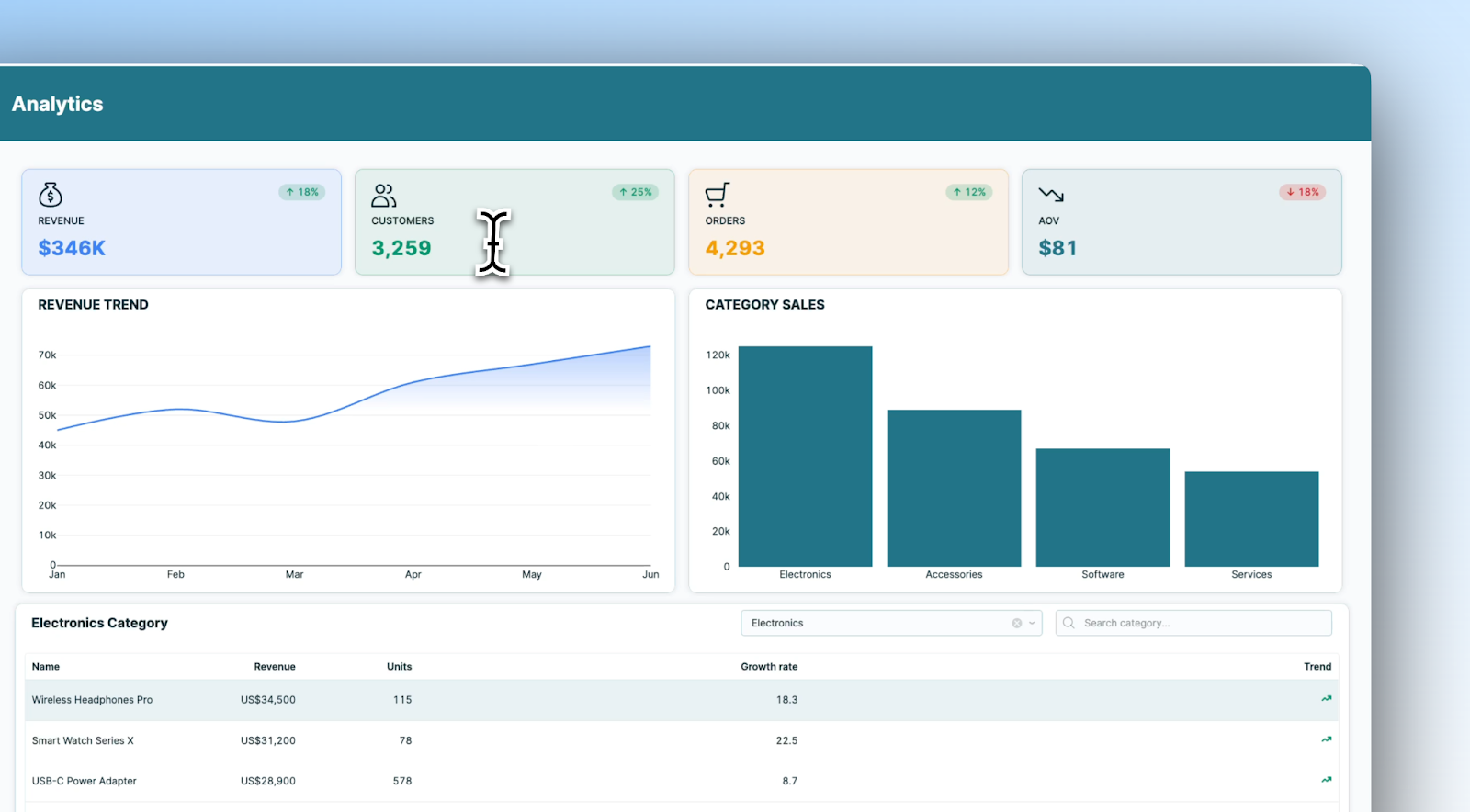
Analytics is where many teams hope to find clarity, but it’s also where fragmentation becomes most visible. Data exists across storefronts, logistics providers, support tools, and finance systems, often with conflicting definitions and delayed updates. Dashboards may show what happened, but not why, and answering ad-hoc operational questions usually requires analyst or engineering support. This makes it difficult for operators to spot trends early, diagnose issues quickly, or make confident decisions.
In our template, the headline panels along the top provide you with the key information you need to know. We’ve also added colour-coded tabs in the right-hand corner of each overview, which tell you the general trend of these stats - is it increasing, or decreasing?
The graphs beneath give more in-depth information on these patterns so you can quickly identify which areas are proving most profitable. To dive more specifically into which products are influencing these trends most, you can look at a more granular product-by-product breakdown of sales.
For example, within the electronics category, you can see that ‘Wireless Headphones Pro’ are your best seller, and you can look at the revenue, units, and growth rate breakdown. Gone are the days of abstract analytics that are fiddly to navigate and ultimately slow to action; with a customized app, you can ensure the information is at your fingertips so you have no excuse not to act on it intelligently.
Customer Support
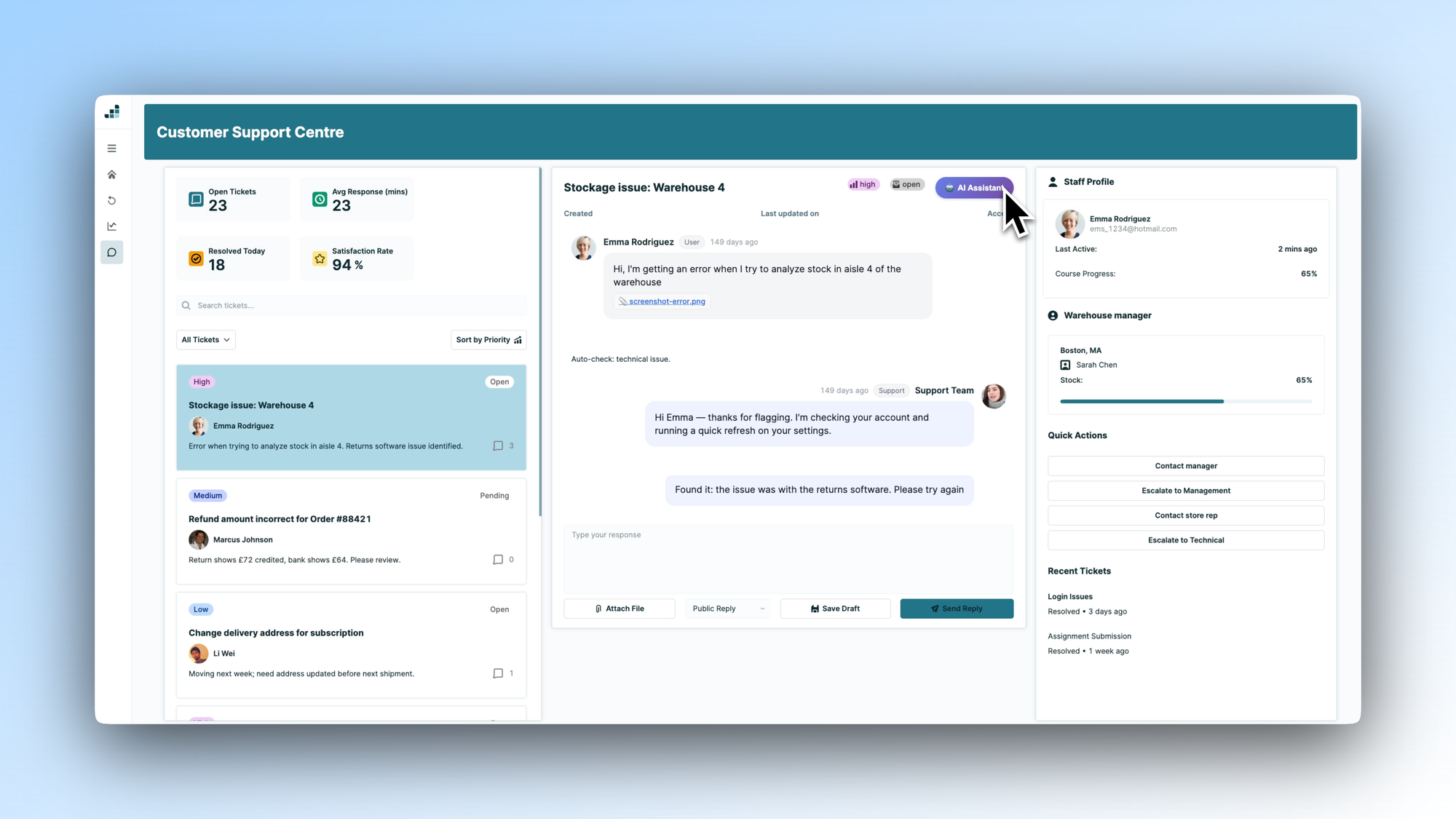
Customer support sits at the intersection of all of these systems. Support teams need fast access to accurate order, shipping, and return information to resolve issues efficiently, yet that context is rarely available in one place. Agents are forced to switch between tools, manually look up details, and piece together customer history while responding in real time. As a result, response times increase and the customer experience becomes inconsistent, even when teams are doing their best.
Customer-client interactions remain at the heart of what eCommerce companies do, so the chat function, optimised for your needs, is central to this UI.
Conversations are easy to navigate, and taking action is made simple through the ‘Quick Actions’ box on the right-hand side, from which you can ‘Issue Refund’, Send tracking’ or ‘Offer Discount’, or even ‘Escalate to Manager’.
Making these actions simple removes the barriers to promptly and practically responding to customers, and these automated actions can be adjusted according to your company’s specific needs.
Download our free eCommerce template below and start building.
Scaling an eCommerce business isn’t just about selling more; it’s about operating smarter. While off-the-shelf platforms help you launch quickly, they aren’t built around your specific workflows, data, and operational challenges. As complexity grows, generic tools create friction instead of clarity.
A custom internal app brings everything together - inventory, returns, analytics, and customer support - into one actionable, real-time view tailored to your business. Our template is a starting point: a practical blueprint to help you build tools that fit your operations, not the other way around.
Download it and start creating an eCommerce engine that’s smooth, scalable, and built for profitability.
You can learn more about building tools on Retool over on our blog.
