


Scattered procedures, missing evidence, findings with no clear owner - this is an app template designed around exactly those problems, with AI surfacing risks and recommended actions throughout.
Financial audits are high-stakes, deadline-driven, and deeply dependent on coordination - between auditors, reviewers, evidence owners, and approvers. When the process is managed across spreadsheets, shared drives, and email threads, things inevitably slip. Evidence requests go untracked. Findings get logged inconsistently. Sign-offs happen informally, with no clear audit trail.
All these scattered processes result in an audit that takes longer than it should, produces more back-and-forth than necessary, and leaves the team scrambling to pull everything together at the close.
We’ve built a Retool template showing what a structured, end-to-end audit management tool could look like - from task tracking and evidence collection through to finding logs and final sign-off, with Claude summarising risks and suggesting reconciliation actions throughout. Think of it as a well-considered foundation to build from, not a fixed product. Every part of it can be adapted to your audit methodology, team structure, and sign-off requirements, and even if you’re not in auditing, you can still use it for UI inspiration.
- Education
- Healthcare
- Media
- eCommerce
- Logistics ops
- HR/Recruitment
and more! Sign up for our newsletter to ensure you're always getting access to our free resources.
Not sure where to start? That’s where we come in. Bold Tech can help you get from template to production-ready in a fraction of the time of traditional development.
Overview: your audit at a glance
The Overview tab is designed as your at-a-glance summary - a place to surface the headlines that matter most to your team at the start of the day, drawn from across the four sections below. What goes here is entirely up to you.
Audit Task Checklist: every procedure tracked, every risk flagged
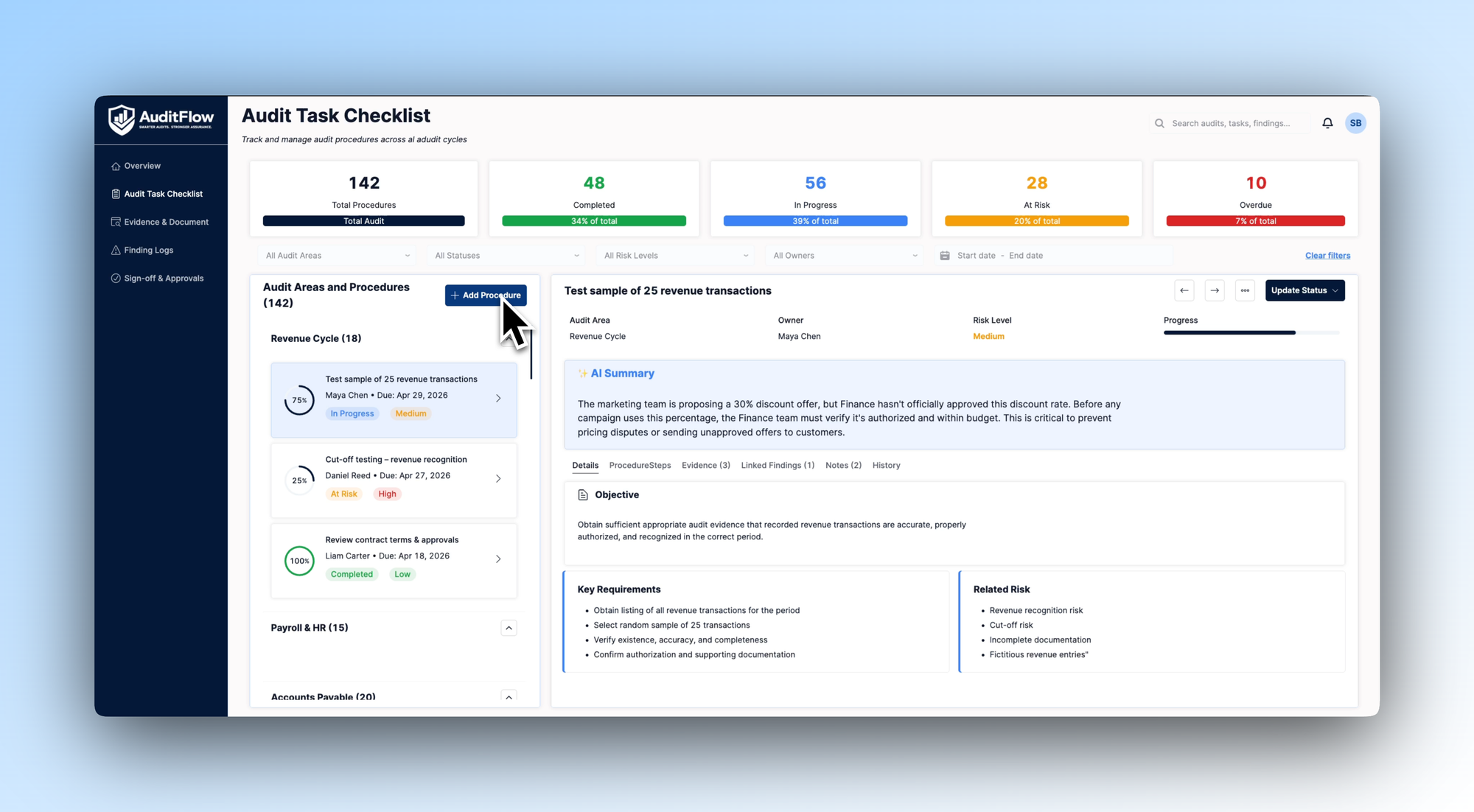
The Audit Task Checklist tab illustrates how an audit team might design a structured view of all procedures across the full audit cycle. Five KPI cards at the top show total procedures, completed, in progress, at risk, and overdue - giving the audit lead an immediate read on where the cycle stands.
Procedures are organised by audit area on the left - Revenue Cycle, Payroll & HR, and so on - each with its own list of tasks showing owner, due date, progress, and risk status. Selecting a task opens a detailed view in the centre panel: objective, key requirements, related risks, procedure steps, linked evidence, and an AI Summary that flags issues the auditor needs to be aware of before proceeding.
Depending on your audit methodology, this tab could be built out with your own procedure libraries, risk frameworks, and due date logic - connected directly to wherever your supporting documentation lives.
Evidence & Document Tracker: full visibility into what's been received, what's missing, and what's flagged
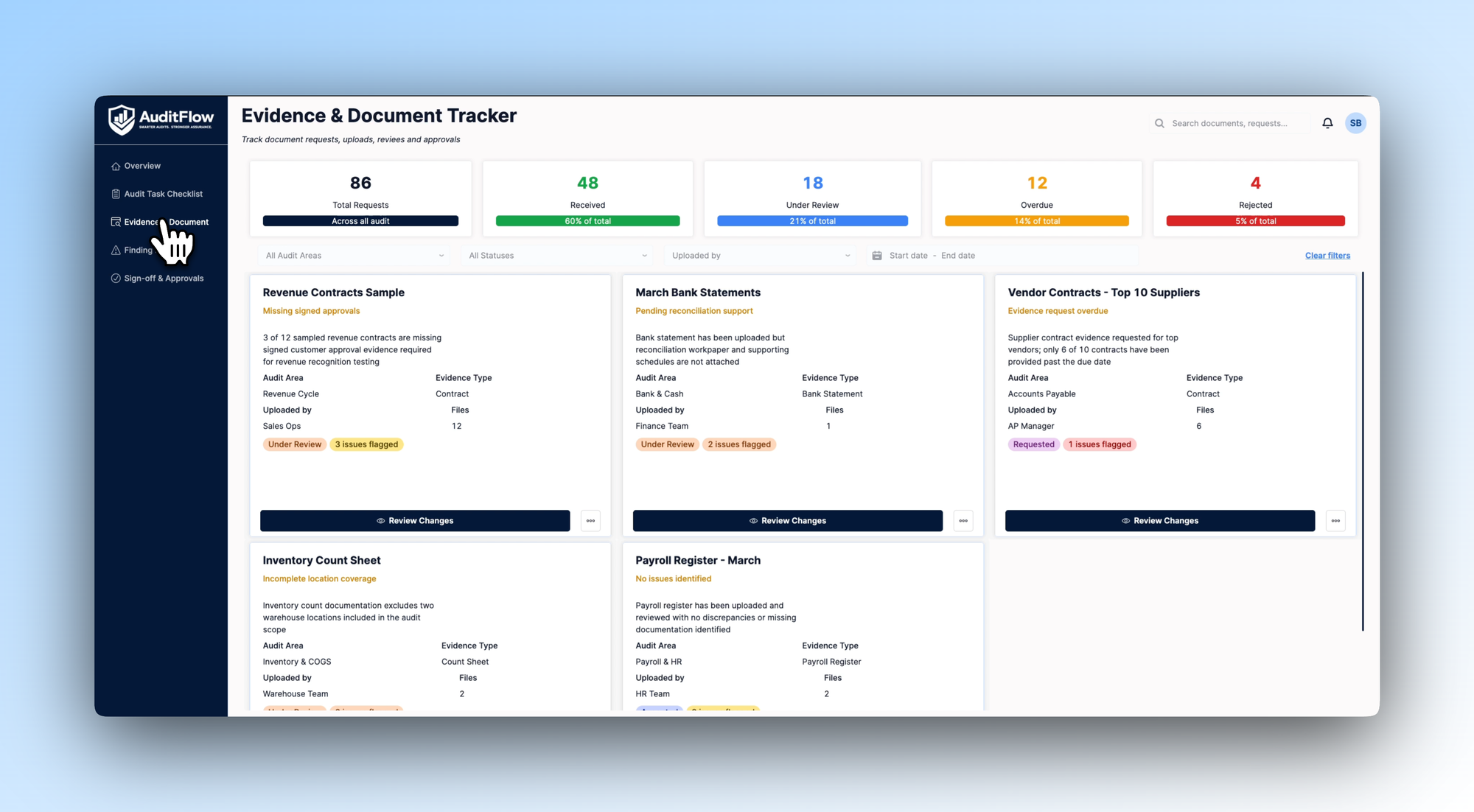
Evidence collection is one of the most time-consuming parts of any audit - and one of the easiest places for things to go wrong. This tab shows one way to design a centralised tracker for all document requests across the audit.
Five KPI cards cover total requests, received, under review, overdue, and rejected. Each evidence card shows the audit area, evidence type, who uploaded it, how many files have been provided, and any issues flagged - missing signed approvals, incomplete location coverage, pending reconciliation support. Status tags make it immediately clear what's under review, what's been requested but not received, and what needs attention.
Based on how your team manages evidence, this view could be extended to include automated chaser reminders, integration with your document management system, or custom issue types mapped to your own audit standards.
Finding Logs: structured findings with AI-suggested reconciliation
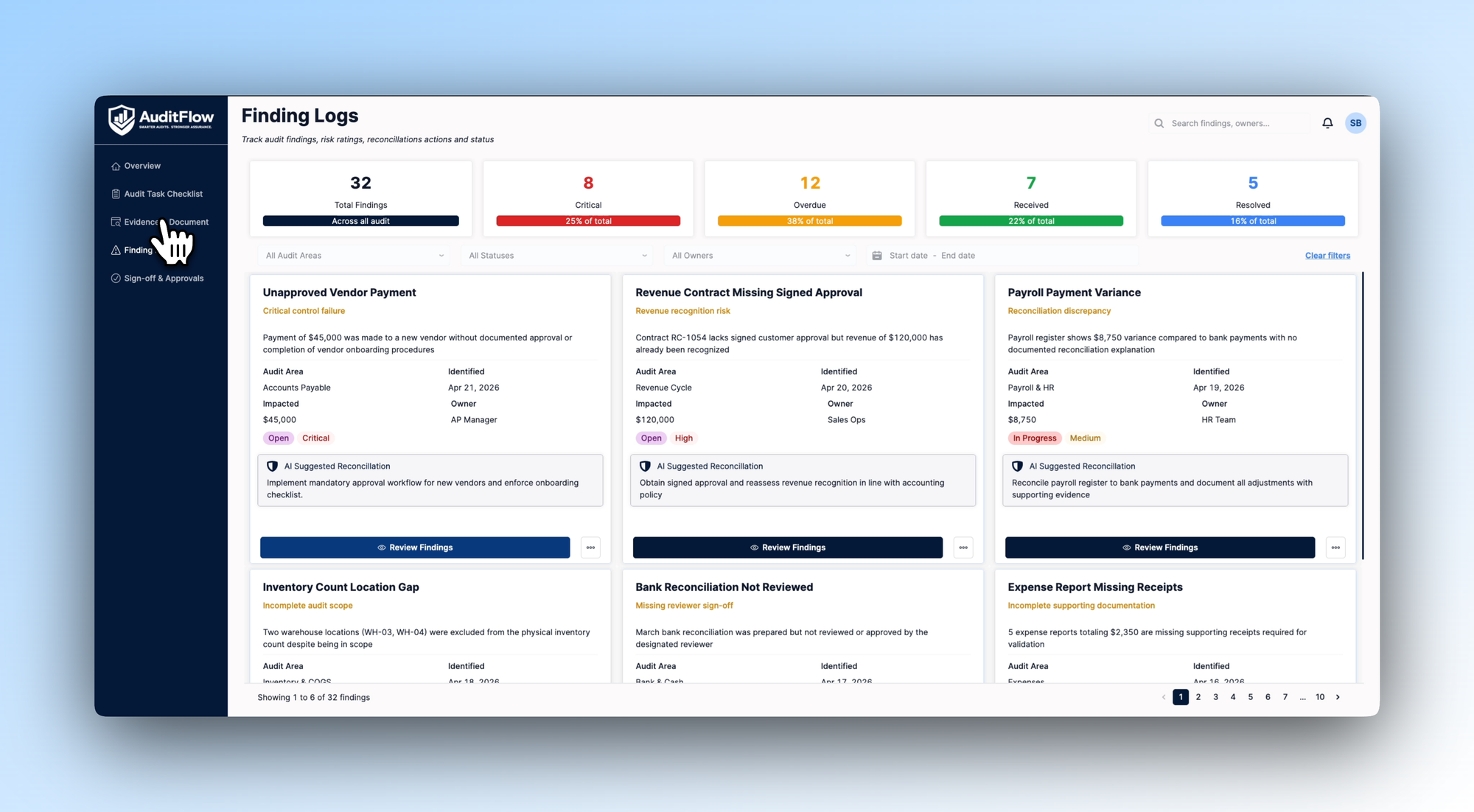
Findings logged inconsistently across an audit are hard to track, harder to resolve, and almost impossible to report on cleanly. This tab illustrates how a team might design a structured findings register that gives every issue a clear owner, status, and path to resolution.
Five KPI cards show total findings, critical, overdue, received, and resolved. Each finding card shows the audit area, date identified, financial impact, owner, severity, and current status - alongside an AI Suggested Reconciliation that tells the auditor exactly what remediation action is recommended, in plain language. Filters by audit area, status, and owner let the team cut to what needs attention most urgently.
We'd recommend thinking carefully about how finding severity and reconciliation logic maps to your own audit standards when building this out - that's where the AI suggestions become genuinely useful rather than generic.
Sign-off & Approvals: a clear path from prepared to final approval
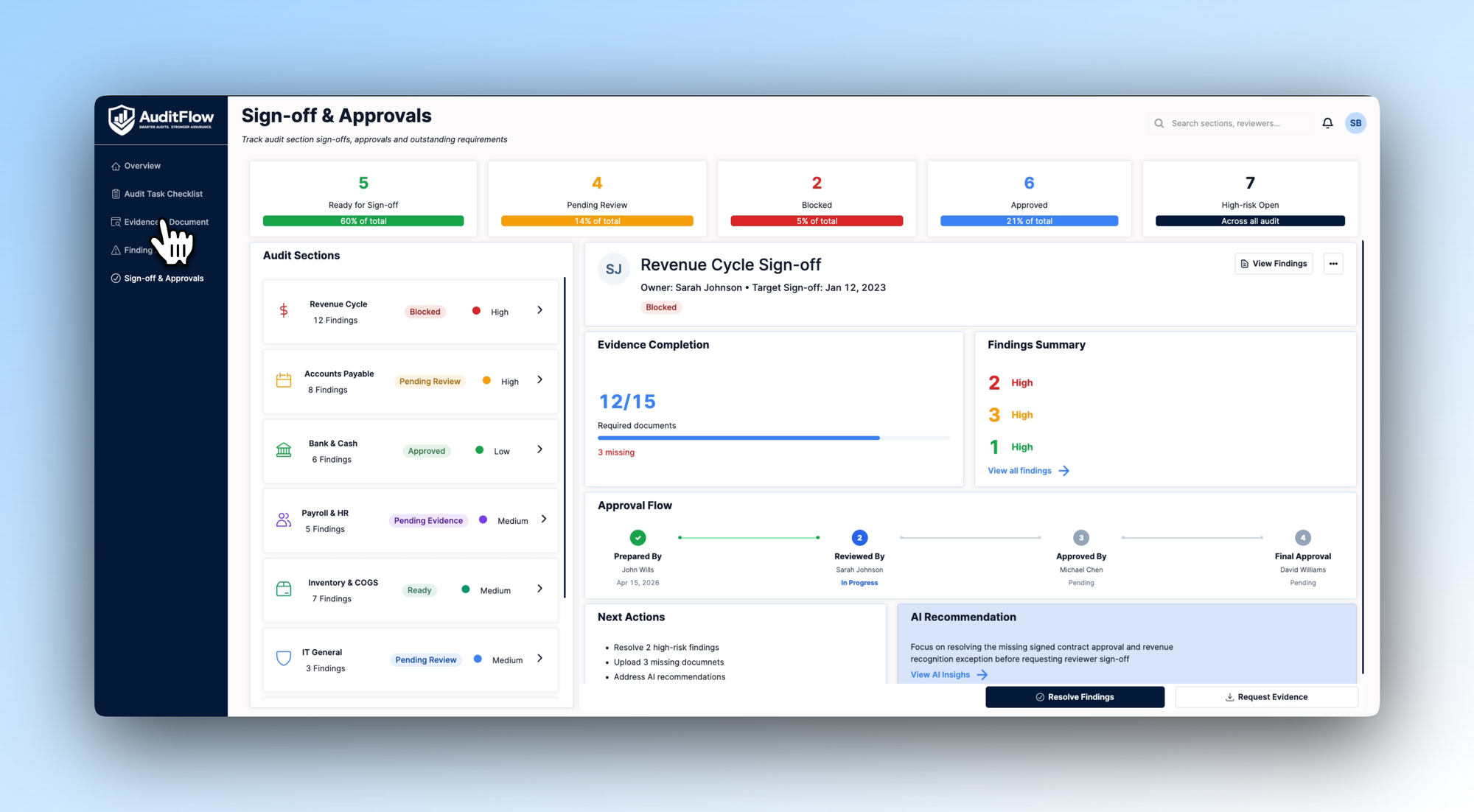
The final stage of any audit is where delays tend to compound - sections blocked on missing evidence, approvals stuck with reviewers who haven't been chased, sign-offs happening informally with no documented trail. This tab shows one way to design a methodical sign-off workflow that makes the path to completion visible and accountable.
Five KPI cards show sections ready for sign-off, pending review, blocked, approved, and high-risk open findings. An audit sections list on the left shows every area with its current status and risk level. Selecting a section opens a detailed view: evidence completion progress, a findings summary broken down by severity, a visual approval flow showing where the section sits in the prepared → reviewed → approved → final approval chain, and an AI Recommendation advising on what needs to be resolved before sign-off can proceed.
The approval chain here is a starting point - the right structure for your team will depend on how many review stages you run and who holds final sign-off authority. If you need help adapting the template for your company’s particular context, reach out and we can work with you to make the perfect app for your team.
Download the template and get building ⬇️
Audit teams don't need more tools - they need one that's actually built around how they work. This template is a starting point for that conversation: a blueprint that shows what structured, AI-assisted audit management could look like in practice, before a single line of custom code is written.
