


In any secure production system, determining which layer should handle authentication is a critical architectural decision, particularly when sensitive data is involved.
Typically, authentication should be handled at the resource layer to enforce consistent permissions. However, MCP introduces challenges here: the server needs to authenticate to multiple resources on the user's behalf while avoiding constant credential prompts and maintaining security.
An MCP tool call is when a client (like ChatGPT or Claude) asks an MCP server to perform a specific action or get some data. The server carries out that request on the actual service or system and sends back the results to the client.
For example, a client might call a search_emails tool, and the MCP server would query the email service and return matching results.
In this scenario, authentication means proving the user's identity to the underlying resource (like the email service) so the MCP server can access that specific user's data on their behalf. It's the process of verifying "I am mitchel@boldtech.dev" to Google's email service, for example, so the server can retrieve your emails rather than someone else's.
According to the MCP standards, authentication (checking who you are) and authorization (setting what you’re allowed to do) are both supposedly optional. However, most companies building MCP servers are doing so to provide LLMs with access to company data, and, naturally, that comes with real requirements around compliance, governance, and security.
 Mitchel Smith
In practice, authentication for most companies will be a pretty unavoidable issue, as access to these data sources will be protected by authorization and authentication procedures.
There are several approaches to how you set up authentication in your MCP, each with its own trade-offs and nuances. In this article, we’ll dive deeper into some of the considerations you might have when approaching authentication in the context of MCP.
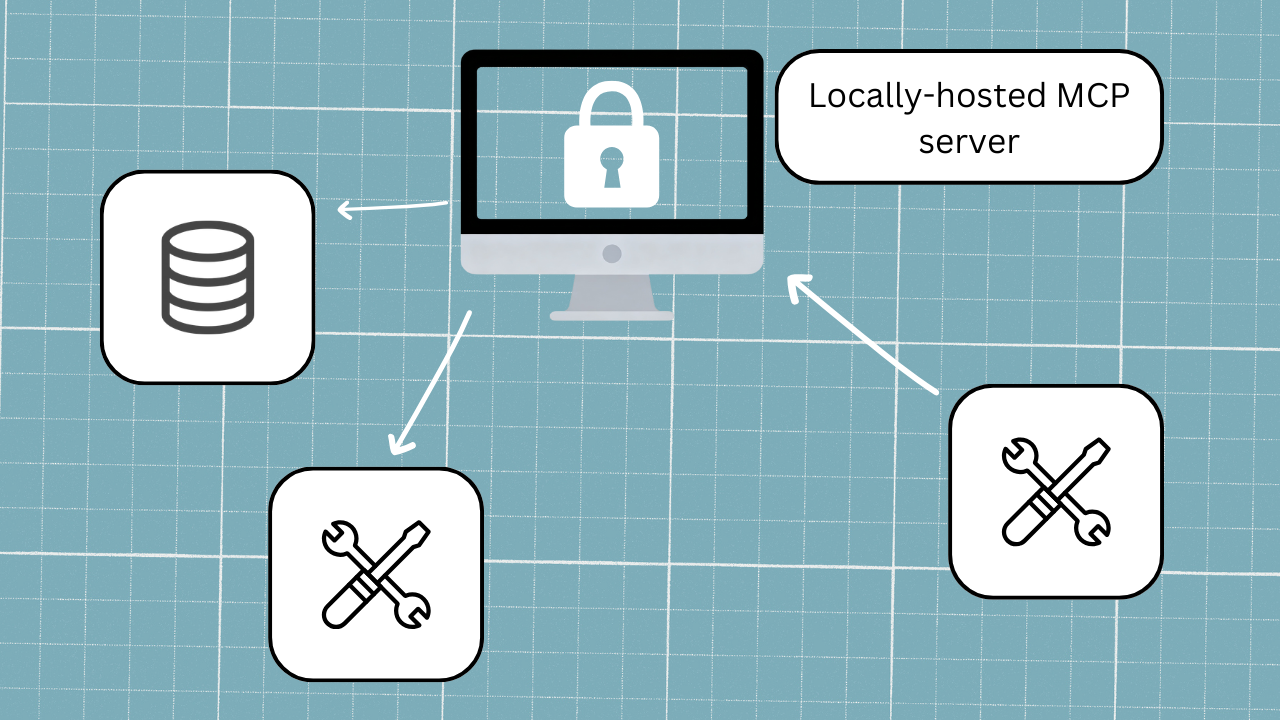
Locally hosted servers approach
Best for technical folk using MCP in a limited way on a single machine. Worst for large teams and non-technical users.
Let's start with the simplest option: a locally hosted server (i.e., authentication restricted to your computer alone).
If you're running MCP locally, you can authenticate resources outside of the server using a platform like Postman, and then store the token securely in your Claude config file on your hard drive.
The security risk here is quite limited, since the server is only ever going to receive calls from your local machine, so there's no need for any complex logic to determine which token belongs to whom. This approach is fairly secure in practice (assuming you're following security best practices for your machine) and reduces the need to re-authenticate between tool calls.
The downside is purely a setup one: you’ve set up the authentication protocol for one machine specifically, and this set-up can’t necessarily be easily transferred to another machine. What’s more, locally hosted servers are much more complex and technical for a user to set up, and they also don’t do things like automatically update. This means that a locally-hosted setup doesn't scale well for MCP production systems that will require regular updates and changes, and particularly for those being used by non-technical people.
That said, this is actually how a lot of the MCP servers you'll find on GitHub work: run it locally, set up a config file, maybe grab an API key, and you're off. Great for someone playing around with MCP, but not so great for a full team deployment.
For most companies that are building MCP servers to enable access to company data for more members of their team, cloud-hosted would be the next logical option. But, there is a catch….
Cloud-hosted approach: authenticating each tool call
Best for avoiding exposing data, but worst for end user experience, which risks MFA fatigue.
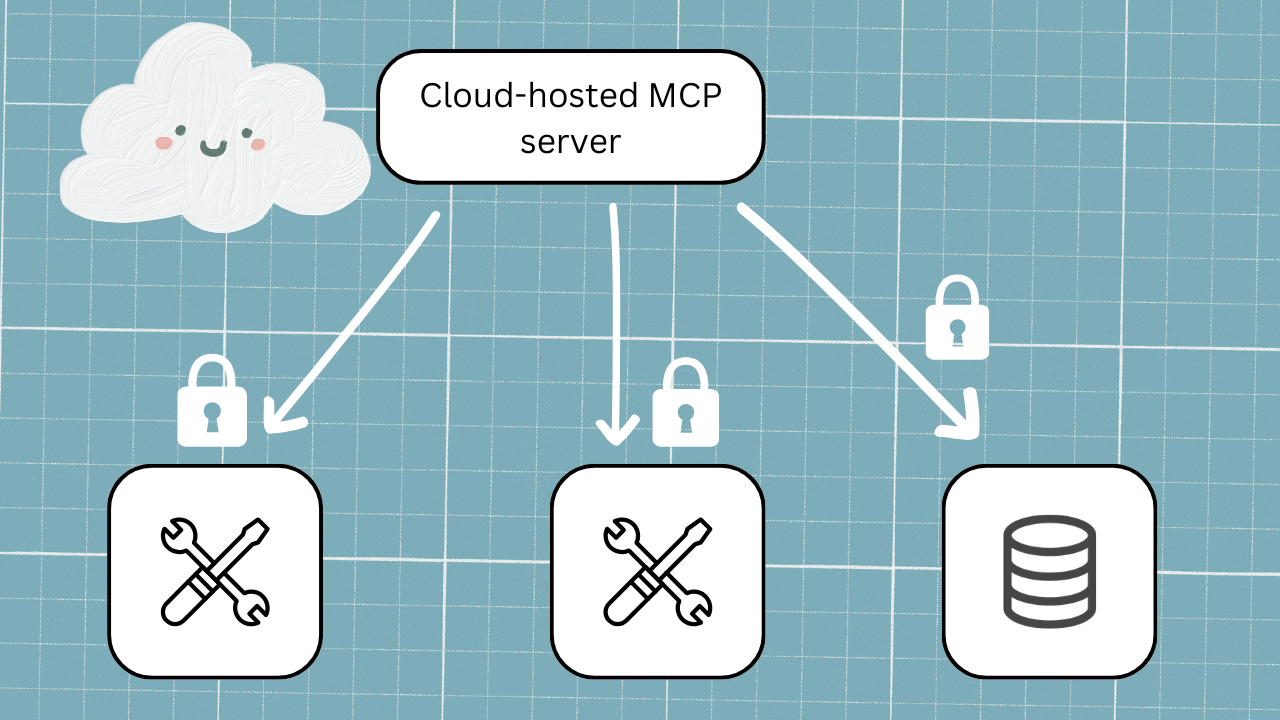
So let's assume we're thinking about cloud-hosted MCP servers. The most secure approach to this, in theory, is to have users authenticate each tool call.
This option really is secure; no access keys need to be persisted anywhere on the server, which means there's nothing to accidentally expose. Even if someone gets access to old chat sessions, there's no data there that they can use.
The problem is that in reality, this process is just brutal for end users. Every time a tool is called by the MCP, it triggers a fresh authentication for the user to execute. Every. Single. Time. For something simple, like an SSO token to log in, that's not such a huge deal, but realistically, most modern systems now have multi-factor authentication (MFA). This means that if a single query needs to run through several different tool calls (which is really the point of MCP), your users are potentially going through the MFA flow multiple times in a single conversation.
That's not just annoying, it's actually a security risk in its own right. MFA fatigue is a real and modern attack vector, where users start approving prompts without thinking, just because they're used to seeing them. So you've got the most secure approach on paper, creating its own vulnerability in practice. Not a great place to be for a production system…
Cloud-hosted approach: Authentication at MCP configuration
Best for solving issues of the above options (MFA and scale), but not always feasible, and security can be leaky.
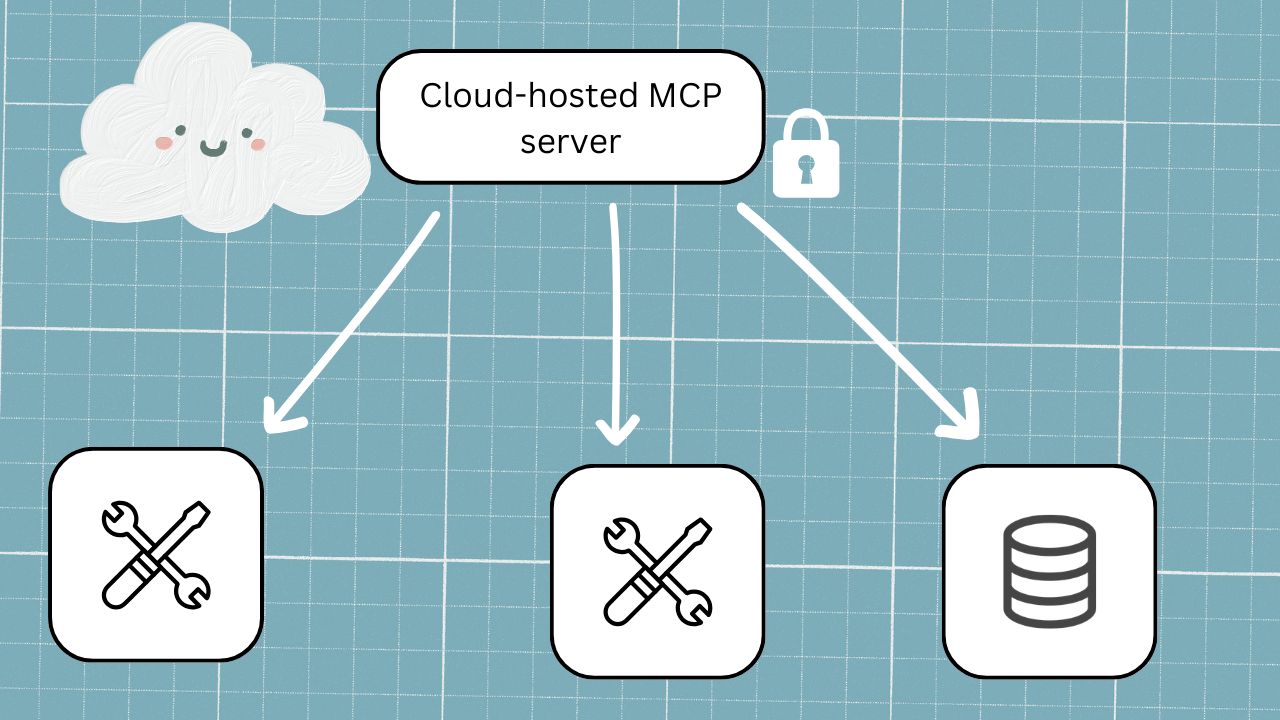
So the natural next step you might work through is to flip the approach: what if we just authenticate the resource once, at the MCP server during configuration, and use that as the credential for everything downstream? That way, the user never has to worry about authenticating it themselves, right?
On the surface, this makes sense. It's simple, it's a single point of authentication set up by the MCP developer, and it gets rid of the MFA fatigue problem entirely. It works a bit as Google Workspace does; you log in once to your Gmail, and you’re already logged in if you then open Docs or Sheets.
The catch is that this only really works if the same authentication covers both the MCP server and the resources it's accessing, and that's not always the case. Say your MCP server uses SSO, but one of the resources it connects to is still on user name and password. Now you've got a mismatch, and authenticating into the MCP server doesn't actually get you into the resource you need to access.
But even when the auth does line up, there are some issues that pop up in the real world. Think about an in-person environment. Imagine you physically give a colleague your laptop and they navigate to Claude, which is already logged in. They instantly have access to data and actions as if they were you, and no one would know the difference. There are cases, especially for developers or users who have access to a variety of permissioned accounts, where this gets a lot messier.
If I only auth once, how do I switch to a different user? How do I impersonate a lower-permissioned account to test something? You can't always update the API or backend systems to handle that.
So, with the cloud-hosted approach, we’re on the right lines, but we need a bit more flexibility on the MCP side to make it actually work. This brings us to our recommended solution.
Our recommended cloud-hosted multilayer approach: single authentication and expiring access tokens
The best solution for scalability and security.
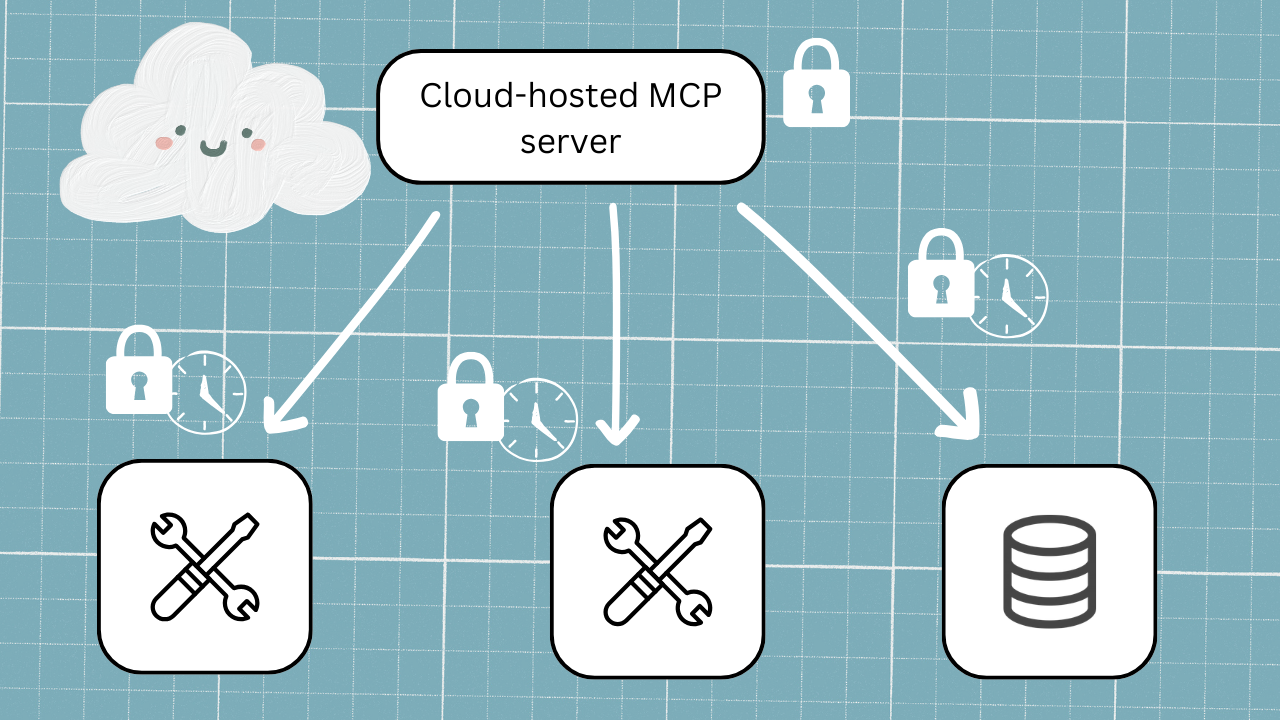
So what does the best solution look like? We’d recommend a 2-layer approach.
- First, you authenticate into the MCP server once using SSO during setup as your first layer, and it stays put.
- Then, when a tool call actually needs to hit a resource for data, the second layer kicks in: the user authenticates to the resource itself, and that access token gets stored server-side, mapped to their session and their identity.
In a prompt example, this might look like:
- Layer 1: MCP Server Authentication: An admin first configures the connector to an app like Linear in the client’s settings by adding OAuth credentials. When a user wants to use the connector to Linear, they go to their connector settings and click "connect." This triggers an SSO flow (like choosing which Google account to sign in with) that authenticates them to the MCP server itself. This authentication is stored, so users don't need to repeat it every time.
- Layer 2: Resource Authentication. Even after connecting to the MCP server, users still need to authenticate to the actual resource. For example, when asking "which Linear user am I signed in as?", the system recognizes you're authenticated to the MCP server but not to Linear itself. It then prompts a second authentication flow where you sign into Linear directly. Once authenticated, the MCP server can access your specific Linear data (showing you're signed in as "Mitchel Smith", for instance) for as long as you set that token to last.
The access token is not sitting there forever, though; it has a lifespan, and that lifespan can be tuned to the sensitivity of the data it's accessing. For something like customer payment data, you might set that at 10 minutes. For something less sensitive, it could be a day, which is longer than most sessions anyway. You could even get more granular than that, calculating the age of the token on each tool call and setting different validity windows for different tools. The point is, nothing persists longer than it needs to.
This covers a lot of the ground we've been talking about:
- You're not re-authenticating every tool call, so MFA fatigue is off the table.
- The token is mapped to a specific user, so you've got visibility into who's actually making the calls.
- And because the resources are authenticating independently, it doesn't matter if the MCP server and the resource behind it are using different auth systems.
This doesn't solve everything, though. If someone is sitting at your open laptop in an active Claude conversation, nothing’s going to stop them from making a call on your behalf (unless you return to problematic option 2 - cloud-hosted, authenticating each tool call). But it’s about as secure as you can get in a workable system.
What happens with this 2-layer method is that the moment the conversation closes or a new one starts, that authentication token is gone. This does mean that each conversation requires re-authentication, but for most real-world scenarios, that's an acceptable tradeoff, especially when you weigh it against the alternative of making your users go through MFA every single time they want to do anything.
TL;DR
Let’s take a very professional analogy to summarize these ideas:
Option 1: Locally-hosted is like hosting drinks at your place; stay in, and drink what you like. The assumption is whoever is in your house in the first place is allowed to help themselves to your hospitality - they’ve already proven who they are to be there. If someone is in the house who shouldn't be, you run into security issues; they could have access to stuff they shouldn’t have.
Option 2: Authenticating every tool call is like IDing someone every single time they try to get a drink at a bar. They order a drink, and they show their ID. They order a shot and then a beer, and they show their ID twice. More drinks, and eventually, it can get exhausting.
Option 3: Authenticating at configuration is like the bouncer carding people at the door. They prove who they are on entry, and once they’re in, they’re in. If the bouncer missed that the customer’s ID is fake, there’s no stopping them now.
Option 4: The 2-layer approach is like a members club - it makes them prove who they are when they walk in, and then remembers them, at least for a period. Sometimes it might need to re-verify (it's been a while) or need them to prove themselves again (they're looking to buy the strong stuff), but generally we assume they are who they say they are.
Choose the right authentication strategy for production-grade MCP systems
In the end, authentication in MCP isn’t about picking the “most secure” option in isolation - it’s about designing a system that balances security, usability, scalability, and operational reality, so your architecture protects sensitive data without exhausting the people who need to use it.
Fill out the form below, and we'll be in touch.

