


Artificial intelligence has come a long way, and every major company has jumped on the AI bandwagon. Notion and Figma use AI to help you design apps. Cursor supercharges your coding. Leonardo generates complex images. The AI gold rush is real.
But there’s a problem when it comes to business tools: all these AI tools were trained on information from the internet. They're brilliant at general knowledge but clueless about your company's data. Your customer database, your internal documents, your proprietary systems? The AI can't touch them. It’s like hiring a genius consultant who knows everything about the world but nothing about your business.
To respond to this challenge, companies have had to resort to either training their own model - costly in money and time - or to passing huge amounts of data to the AI, with little control over how it was stored, used, or retained.
The widespread and imperfect adoption of AI, for a multitude of different use cases, increasingly highlights a missing piece: standardization. MCP (Model Context Protocol) solves this, providing a universal, interoperable approach that makes AI truly plug-and-play.
So, what actually is Model Context Protocol (MCP)?
And is it the genius consultant who knows everything about my business?
Well, it’s not the genius consultant itself, but it certainly helps AI to be.
For the less technical folks: think of it like a USB adaptor for AI and your business knowledge base.
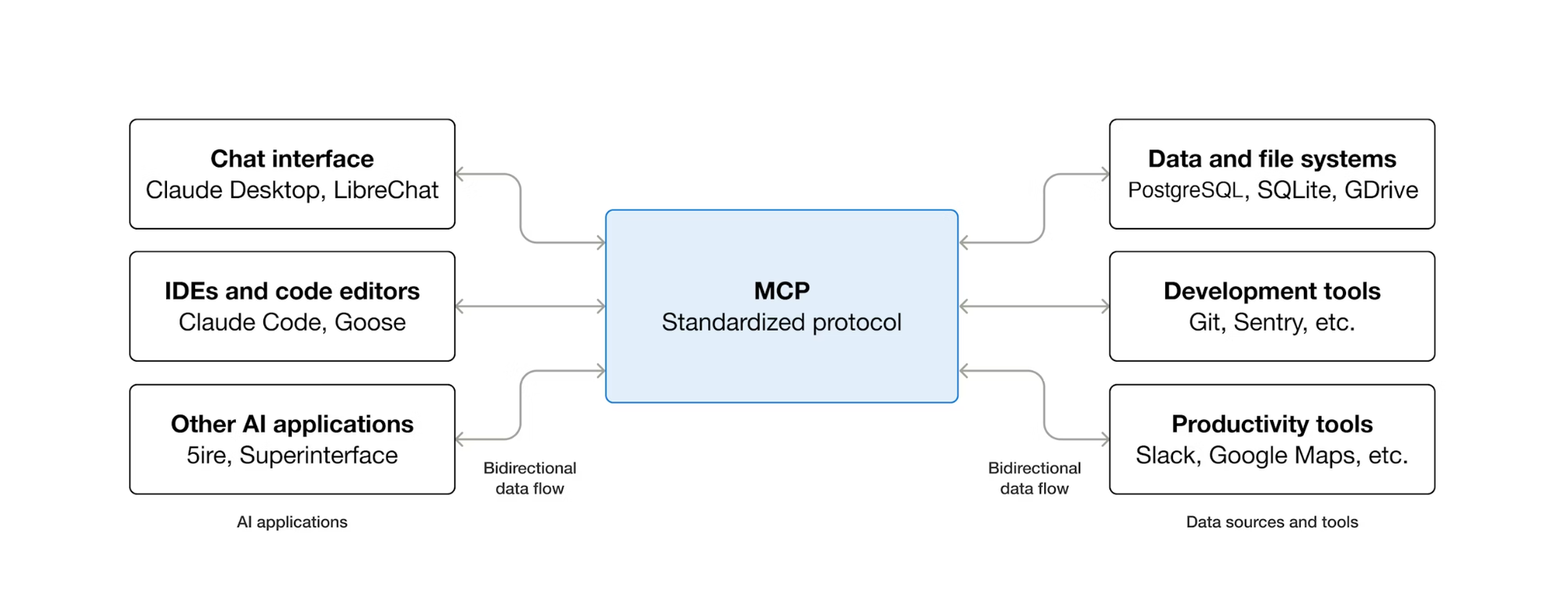
For the technical folks, you can think of it this way: MCP is to AI what HTTP is to the web. Just as HTTP defines standard rules so any browser can communicate with any website, MCP defines standard rules so any AI model can communicate with your company resources.
MCP itself isn’t a resource, though; it’s the protocol that tells the AI models what resources they should have access to. The way it actually exposes access to these resources is by defining tools. These tools can be anything: a function that adds two numbers, a tool that encrypts text, or (most commonly at the moment) tools for accessing and processing data (LLMs). MCP helps us interact with our data in two main ways::
- Centralization: MCP brings all your AI tools and data access points into a single, unified protocol, reducing fragmentation and simplifying orchestration across models.
- Accessibility: By standardizing how tools expose capabilities and share context, MCP lowers the barrier to building more complex AI workflows. It makes advanced AI behaviour possible, even across tools that were never designed to work together.
How do MCPs work?
For those who are new to MCP, let’s illustrate how it works with the commonly used USB analogy.
If an LLM (Large Language Model) is the computer that wants to perform useful functions, and your systems and APIs are the mouse, screen, and keyboard by which these functions can happen, MCP is like the USB port that standardizes the connection and makes sure nothing explodes when you plug them in.
MCP has three parts:
- The MCP Standard: The USB plug design. The standard is a set of rules, so as long as the USB-A adaptor is designed to correctly fit the USB-A port, it will work. "Follow these specifications, and what you build will work with anything that accepts MCP."
- The MCP Client: the port. The client is the USB port. Its job is to be the right shape for an MCP server to plug into so it can deliver what it needs. For USB, that's power and data transfer. For MCP, it’s the AI application that's securing access to LLMs and accepting compatible MCP servers.
- The MCP Server: what you plug in. Just like a thumb drive provides data transfer (whether vacation photos or a virus), or a power cable provides power, when you ‘plug in’ an MCP server, you might provide access to your company’s data.
Why do standards matter? Ten years ago, every device had a different charger. Now, you can grab any USB-C cable and plug it into any USB-C port - but you still choose what you plug in, and who’s allowed to use it. That's what MCP does for AI and data: one universal interface, with clear boundaries and access controls, instead of a drawer full of fragile, custom cables.
MCP and your internal tool stack: key considerations
Here are a few things to think through before you start building MCP servers to integrate into your internal toolstack.
Knowing when and what to build
So MCP sounds like the shiny new magic solution to all your work problems, right? Not exactly. MCPs take time to build, require ongoing fine-tuning (as your business needs change), and need proper security implementation. You're essentially creating another piece of infrastructure that needs to be deployed, monitored, and updated. And just like with any internal tool, it's essential to evaluate the true value of an MCP server before building one.
The question isn't "Can we build an MCP server?" but "Should we?" Not every data source needs AI access. Not every workflow benefits from automation. Just like with any internal tool, before you start building, you’ll need to consider whether the time saved justifies the time invested, whether your team will actually use it, and whether the data you're exposing is worth the effort to secure and maintain.
The true power of MCP is unlocked when you intelligently connect your tools, layering the power and flexibility of LLMs on top of them, and make them easily accessible to your team.
Deployment approaches
There are two main options for deploying MCP, and it’s best to decide before you start building, as each approach impacts how you actually build the system and how you tackle problems like logging, authentication, and security. These are:
- A containerized deployment that each user hosts locally
- Cloud deployment
Your choice depends largely on who's using the server. For small, highly technical teams, a containerized local deployment can work well - updates can be installed manually, configuration lives close to the team, and everyone is working in a terminal.
For larger organizations with thousands of users and varying technical skill levels, this approach doesn’t scale. Cloud deployment becomes essential, enabling automated installs, centralized configuration, and admin-level control so tools can be rolled out, updated, and enabled with minimal friction.
The power of multiple MCP servers
Building a single server locally is straightforward. I can connect to my Postgres MCP server, which helps me write SQL queries and execute them against my database - useful, right? But it’s nothing groundbreaking on its own: most of us who could spin up this MCP server could spin up the SQL query ourselves without too much difficulty anyway.
The real potential for MCP comes when multiple deployed servers work together.
The true power of MCP isn't in a single isolated server. It's the ecosystem. One MCP server pulls customer data from your CRM, another grabs financial reports, a third generates charts, and a fourth summarizes and distributes via Slack.
Each server does one thing well. Together, they compress hours of manual work into a single AI conversation. Just like a computer becomes a workstation when you plug in a monitor, keyboard, and mouse, AI becomes your command center when you plug in your systems.
That said, it often makes sense to separate servers by domain or security boundary. You might have one server for your CRM, another for your financial systems, and another for communication tools, not because you technically have to, but because it's cleaner to maintain and easier to control access permissions.
What is MCP good for?
Just like a great internal tool does, MCP excels at connecting multiple tools into a single, coherent workflow.
Say you need to pull data from your database, generate charts in Power BI, and email them as a PDF report to your team. Normally, that means jumping between several tools - querying data in one place, exporting it, importing it somewhere else, and repeating the process until everything lines up. That's normally multiple separate tools you're jumping between.
With MCP, that entire workflow can happen inside Claude, ChatGPT, or your favorite MCP Client. You can work step-by-step with AI, refining your approach while it's actually directly accessing and operating on your data.
Instead of juggling 8+ different tools - write something here, copy-paste there, download, repeat - you move to a single conversation: "do this, now do that." MCP supports the full end-to-end workflow without you needing to do all this context switching, and everything lives in one place that you can return to later.
Just as importantly, MCP lowers the barrier to using technical systems. Non-technical users don’t need to read API documentation, understand schemas, or learn new interfaces. They can simply ask the AI what’s possible - “Can you pull this kind of data?” - and the AI either does it, or explains why it can’t.
What is MCP not good at yet?
Error handling is rough. MCP often gets stuck in "Oops, something went wrong, let me try again" loops when it doesn't find what it expects. It will continue to just fail over and over until it just sort of… dies. This can be particularly problematic for more complex tasks.
It's still an LLM. An MCP client will say "Great idea, let's go for it" instead of pushing back on bad requests, which can send you straight into those failure loops.
Deployment isn't fully mature:
- Local containerized deployment is solid technically, but asks a lot of non-technical users. They need to set up Docker, edit config files, create secure keys, and run terminal commands. This might be fine for small technical teams, but not scalable to hundreds of users. Nevertheless, for the moment, we find that MCP runs better locally.
- Cloud deployment is much easier to configure (literally click and paste a URL), but it is more complex to deploy securely and comes with additional hosting costs.
It's non-deterministic by design. MCP standardizes how AI connects to and uses tools, but it doesn't guarantee identical outputs every time. If you need perfectly repeatable results, use an API endpoint instead. The tools within MCP are consistent, but the AI decides when and how to use them, so your results can vary.
Think of it this way: MCP ensures a stable workflow and safe access to your resources, while the AI interprets and plans tasks in a flexible, intelligent way.
Building your MCP ecosystem
At Bold Tech, we believe that a unified, thoughtful ecosystem approach is the difference between AI as a gimmick and AI as a useful tool. A single MCP server is fine, but having multiple servers working together with LLM-supported workflows is where true, long-term value comes from.
We've seen these implementations before. We know which patterns work, which pitfalls to avoid, and how to connect your MCP servers into workflows that genuinely save time. If you're considering MCP integration or broader AI adoption, we can help you design an ecosystem that delivers real value, not just another tool that sits unused.
Fill out the form below and we'll be in touch.

