


Our client provides law firms and recruiters with data on the legal talent market, tracking where attorneys work and when they move. Data is the bread and butter of what they do, so they crucially need to get that part right; everything else is built from there.
Much of that data starts life as web-scraped exports covering attorneys' titles, office locations, law schools and practice areas. The data arrives as a CSV; the existing web scrapers do a basic amount of cleaning (stripping out HTML tags for example) but it’s hardly in a shape that can be confidently read and applied. Every export has to be cleaned and standardized against the client’s own location taxonomy and firm office lists before the team can get on with the analysis that's their real expertise. Until recently, that meant a person working through it cell by cell.
A typical export runs to about 6,000 rows, and we focused on processing three of its columns. That's 18,000 cells. Even at one second per cell, that's five hours of review for a single file.
We ran the tool on real exports. Assuming the same review of the one second per cell, which is a conservative estimate for a person checking data by hand, the total time to process a file drops to just 20 minutes.
What the tool does
The app takes each export and checks every value against a set of rules we developed by studying months of files the client’s team had cleaned by hand, working out the patterns behind their decisions. Alongside that, AI makes its own suggestions. The app then scores how confident it is in each answer. Anything it's more than 95% sure of is resolved automatically and never needs a human to look at it. For the rest, it offers recommended options along with its reasoning, so the reviewer is usually approving a suggestion rather than researching from scratch.
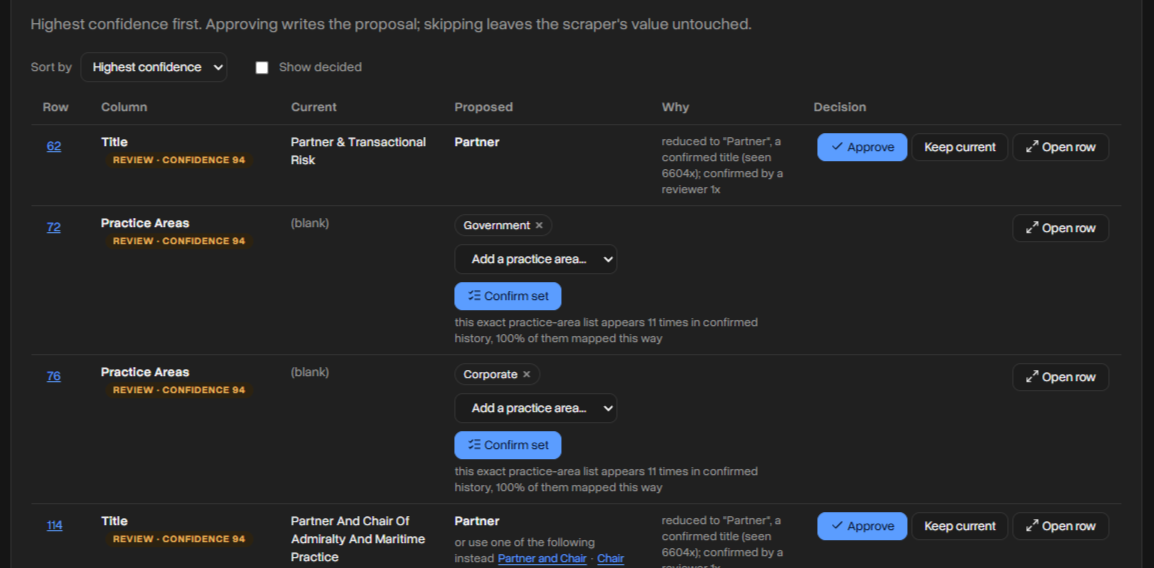
Where the rules can't settle a value, Claude reads the attorney's bio and other supporting columns to suggest one. This is where most AI tools run into trouble. When a language model doesn't know the answer, it tends to make one up, and those made-up answers are hard to catch because they look plausible and nothing flags them as guesses. For example, a fabricated office location reads just like a real one.
The tool is built to avoid that. Claude primarily chooses from the client’s approved lists. When it isn’t sure, it may make a guess, but it won’t do so without telling anyone: the cell is flagged for a person to review, along with the AI's suggestion and its reasoning.
The data stays under the client’s control throughout. The app is self-hosted, the spreadsheet is processed in the browser, and only the unresolved cells are sent to the AI, via AWS Bedrock.

How the confidence score works
The confidence score does most of the heavy lifting, so it's worth explaining how it's built.
To develop the rules, we compared pairs of files: the raw web-scraped version and the version a person had processed. Each cell now goes through those rules to produce a suggested value. Separately, the cell and its supporting cells go through the AI to produce a second suggested value.
That leaves three candidates: the original value, the rules' answer and the AI's answer. We then use AI to compare them and produce a confidence rating. When all three agree, confidence is high. The more they diverge, the lower it drops. Only cells above 95% are approved without a human.
The results
We measured the tool against human-processed files, so "correct" here means "matches what the human reviewer produced."
Across Title, Location and Law School combined, 93% of cells were resolved automatically. Location shows the tool at its most useful: fewer than six in ten scraped values were usable as-is, and the tool raised that to nearly nine in ten. Practice Areas is the hardest column and the one where we had the least training data, so there's more room to grow there.
Why 94.8% beats 96.1%
At first glance, the Title row looks like the AI made things worse: 96.1% of scraped titles were already correct, but the tool only resolves 94.8% automatically.
Those two numbers measure different things, though. The 96.1% means most scraped titles happen to be right, but there's no way of knowing which 3.9% are wrong. The team would either have to check every single title by hand or let those errors reach their customers.
The 94.8% is the share the tool was confident enough to handle on its own. The remaining 5.2% aren't mistakes. They're the cells it sets aside for a person to check, and many already come with the right answer suggested, so the reviewer just clicks to approve.
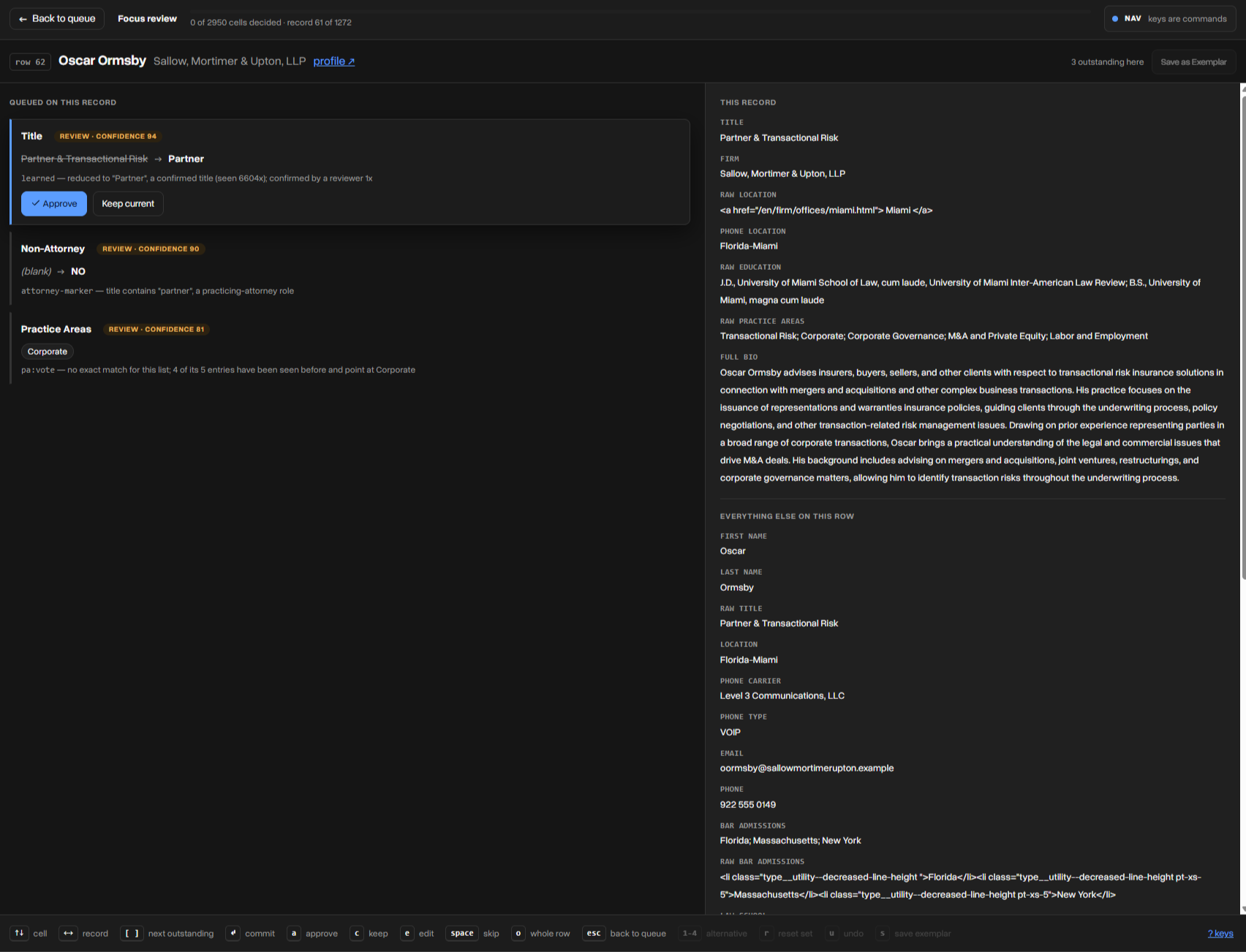
In other words, the tool doesn't just clean the data; it tells you exactly where to look. Instead of reviewing all 849 titles, the team would review a few dozen.
How often is it confidently wrong?
The number that matters most is how often the tool auto-approves a cell that turns out not to match the human's answer. That happens less than 1% of the time, and most of those cases fall into two groups.
The first is near misses. The tool might output "Charlotte-North Carolina" where the human wrote "Charlotte-North Carolina (Remote)." Missing the tag is an error, but a small one.
The second is corrections. Sometimes the tool outputs "Charlotte-North Carolina" and the human-processed file says "Charllote-North Carolina." The tool got it right and the person made a typo, but because we measure against the human's version, it counts as a mistake. Some of the tool's "errors" are really its best work.
The impact
With 93% of Title, Location and Law School cells resolved automatically, a five-hour review drops to around 20 minutes. Across our client’s main exports, that works out to around 20 hours a month, or roughly 235 hours a year.
And because reviewers' decisions feed back into the system, those numbers should keep improving the more it's used.

