


The Retool Classic App Converter lets you migrate classic apps to the new React-based app builder. The process is straightforward on paper: create a new app, click Convert classic app, select your source app, and wait. But whether that's the end of the story depends almost entirely on the size and complexity of what you're converting.
Here's what we've found from testing it directly.
How it works in practice
For smaller apps, the converter can be remarkably effective. To check the ‘size’ of your app, go to Debug > Performance > App Size:
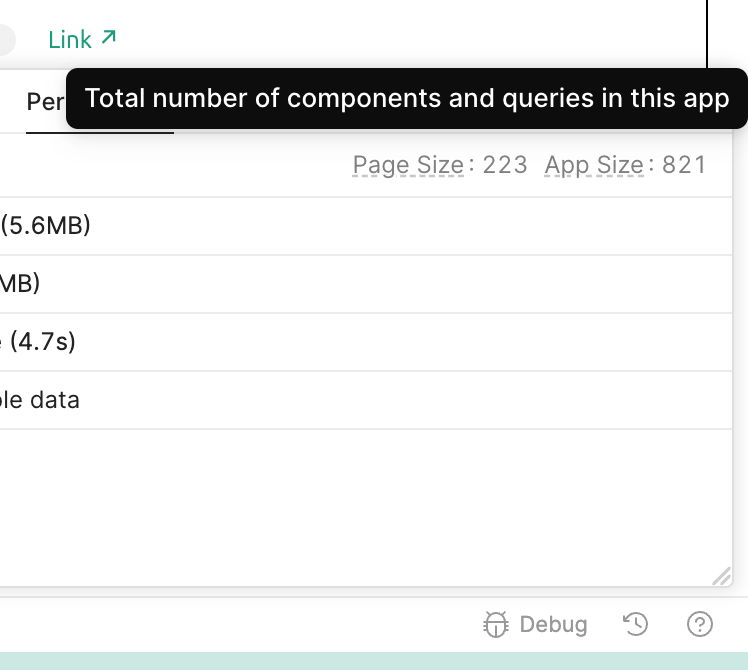
One of our developers converted an app with just over 200 components and it came through with only minimal tweaks required - essentially a one-shot migration. For that use case, the tool does what it promises.
Larger apps are a different story. As of June 2026, Retool has been testing the converter with apps around 800 components and reports it working well at that scale. Our own experience with an app around that size didn't go as smoothly. And for the kinds of large, complex apps we build for clients - we have production apps with 2,400, 3,500, and upwards of 18,000 components - automated one-shot migration isn't a realistic expectation at this point (June 2026).
A few other things worth knowing going in:
Migrations take time. Even a simple app can take over an hour. Plan around it rather than watching the progress bar.
Migrations are currently free - if you're on an Enterprise plan using a Retool-managed key, conversions don't count toward your token limit. If you bring your own API key, Retool estimates the cost at around $30–50 for a medium-sized app.
If the conversion doesn't work well, your options are limited. You can restart or iterate on whatever output it produced, but there's no granular control over the process. For larger apps, we would hope for better tooling from Retool, for example, page-by-page conversion.
The timeline question
The new Retool is here to stay - Retool is aiming for GA at the end of the year, so there's still plenty of time to explore the new editor before then. Classic apps won't disappear overnight either; we can expect them to be supported well beyond GA, as many enterprise customers still rely on them.
The practical takeaway: there's no need to rush, but migration should be on your planning horizon, not your backlog.
Is now the right time to migrate?
For small, self-contained apps with no blockers, yes - migrating now is a good way to get hands-on with the new app builder and the conversion process is likely to go well.
For everything else, it's worth pausing. Here are the situations where we'd recommend holding off:
Hard blockers - don't migrate yet if your app uses custom React components or resource types not yet supported in the new app building experience (Retool maintains a list of supported resources in their docs). These aren't solvable with iteration; the functionality simply isn't there yet.
Apps using Modules - Module support isn't available in the new app builder. If your apps share functionality via Modules, migration will break that. Query Library can be migrated, but as with reusable functions and libraries, queries can't yet be shared across apps.
Large apps - if your app is significantly above the 800-component range, a one-shot conversion is unlikely to produce a usable result. These apps need a more deliberate migration strategy, proper QA, and a period of running the old and new versions in parallel before cutting over.
Teams not yet comfortable with React - The app builder's AI-assisted editing handles most day-to-day changes, but when something goes wrong you need someone who can work with React source code directly, or at least debug it with AI assistance. If that capability isn't on the team yet, it's worth building it before migrating apps your business depends on.
The bottom line
The Retool Classic App Converter is effective for the apps it's built for. For smaller, self-contained apps without the blockers above, it's worth trying now. For larger or more complex apps, the honest answer is that the tooling isn't quite there yet - and a rushed migration creates more risk than the status quo.
Classic apps aren't going anywhere for a while. Use that time to migrate strategically rather than all at once.

