


Legal and compliance teams carry a lot of quiet risk. Contracts expire without anyone noticing. Compliance obligations sit with owners who haven't been chased. Approval workflows happen over email, leaving no clear record of who signed off what and when. And because most of this work happens in the background - until something goes wrong - it rarely gets the tooling investment it deserves.
The result is a function that's permanently reactive, managing risk through a combination of spreadsheets, calendar reminders, and institutional memory. That works until someone leaves, a deadline gets missed, or an auditor asks a question nobody can answer cleanly.
This is a Retool template that shows what a structured, centralised legal and compliance workspace could look like in your own, personalised app; think contract tracking, obligation management, approval workflows, and a full audit log in one place, with Claude surfacing risk signals and recommended actions throughout. It's a starting point to build from, not a finished product. Every part of it can be shaped around your contracts, your compliance frameworks, and how your legal team actually works.
Want to know a bit more about Retool? We've got plenty of resources on all things Retool: head to our blog, where we have Retool templates, tutorials and other resources, or check out our full What is Retool guide:
 Tools Team
Overview: everything urgent, in one place
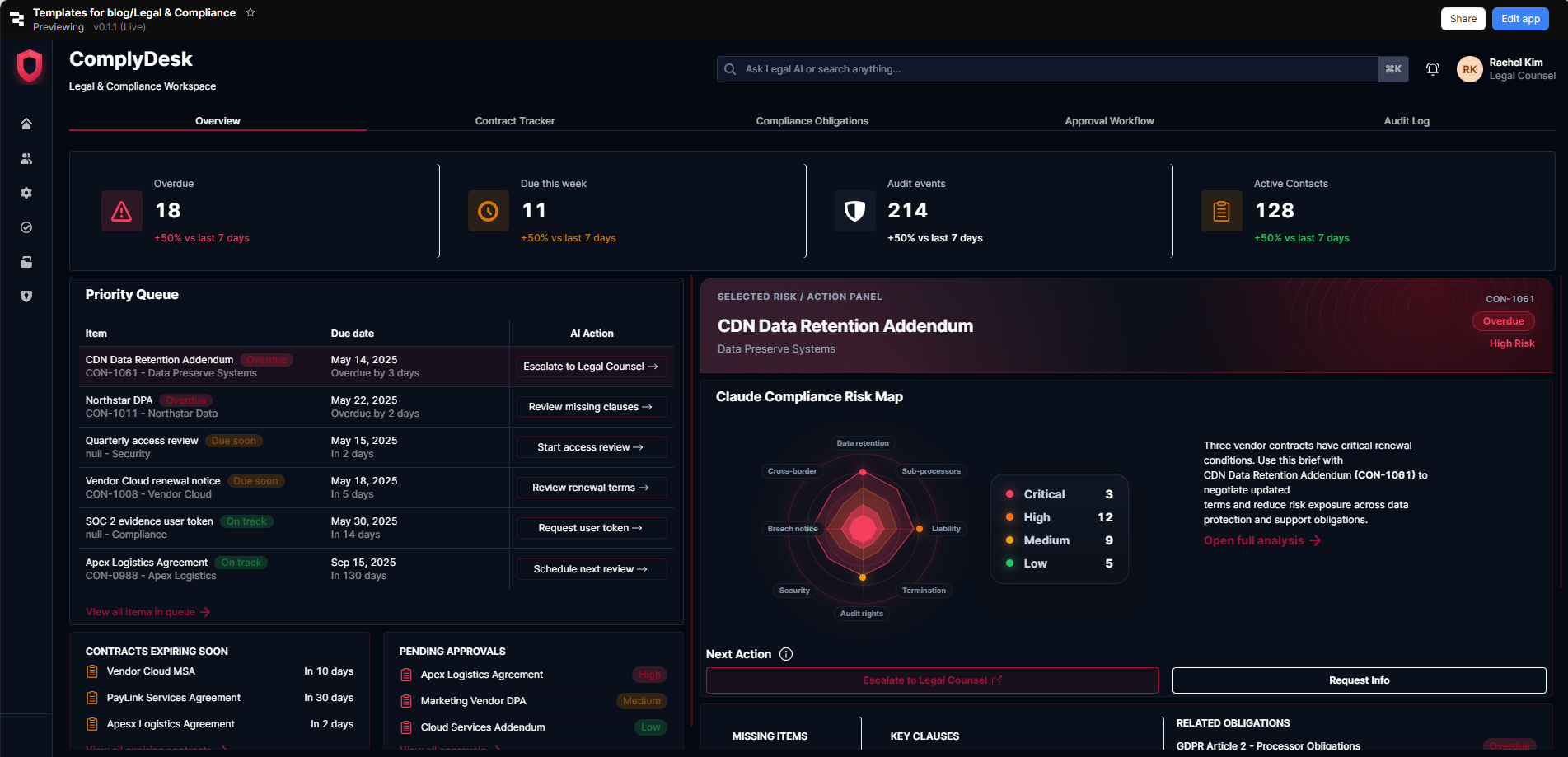
The Overview tab illustrates how a legal or compliance manager might design their daily starting point. Four KPI cards show overdue items, due this week, audit events, and active contacts - each with a week-on-week trend. A Priority Queue lists the most urgent items across contracts and obligations, with due dates, status tags, and an AI Action recommendation for each - escalate to legal counsel, review missing clauses, start an access review - so the day's priorities are clear without any manual triage.
A Selected Risk panel on the right opens a Claude Compliance Risk Map for the highlighted item - a radar chart plotting risk across data retention, sub-processors, liability, termination, security, audit rights, and breach notice - alongside a plain-language summary and a recommended next action. Contracts expiring soon and pending approvals sit at the bottom, giving the full picture at a glance.
The right starting point when building this out is connecting it to your contract management system and compliance framework - that's what gives the AI risk signals their teeth.
Contract Tracker: every contract, every deadline, every next step
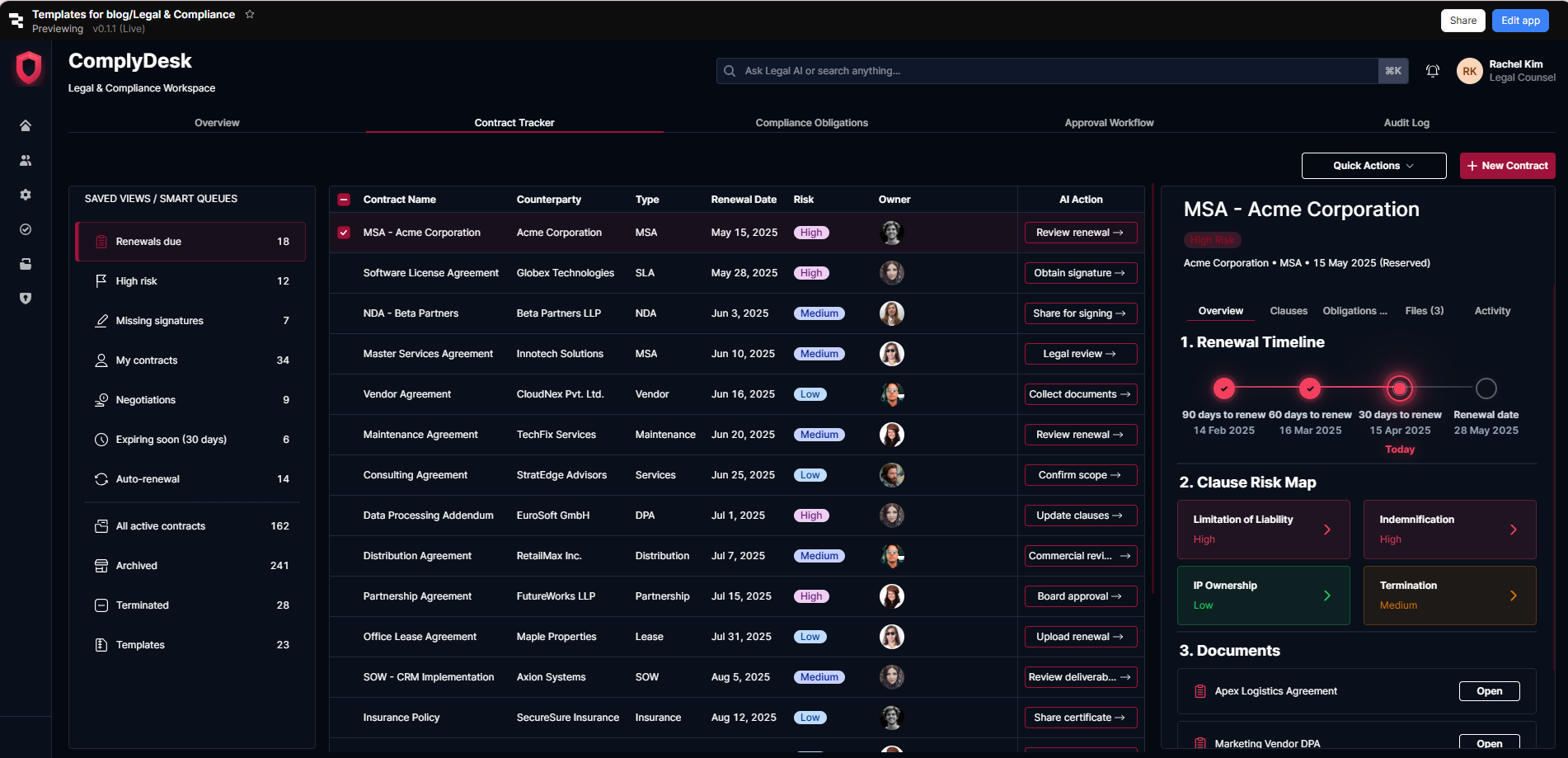
Contract management without a centralised tracker means deadlines get missed, renewals get overlooked, and the legal team spends more time chasing documents than reviewing them. This tab shows one way to design a structured contract register that makes the full portfolio visible and actionable.
Smart queues on the left filter contracts by renewals due, high risk, missing signatures, negotiations in progress, and expiring soon - so the team can always see what needs attention most urgently. The main table shows each contract with counterparty, type, renewal date, risk rating, owner, and an AI-recommended action. Selecting a contract opens a detailed panel with a renewal timeline, clause risk map, and linked documents.
Depending on how your contracts are currently stored, this could be connected to your document management system or built as a standalone register - either way, the clause risk scoring and renewal timeline are where it starts to pay for itself.
- Education
- Healthcare
- Media
- eCommerce
- Logistics ops
- HR/Recruitment
and more! Sign up for our newsletter to ensure you're always getting access to our free resources.
Compliance Obligations: structured tracking from due to compliant
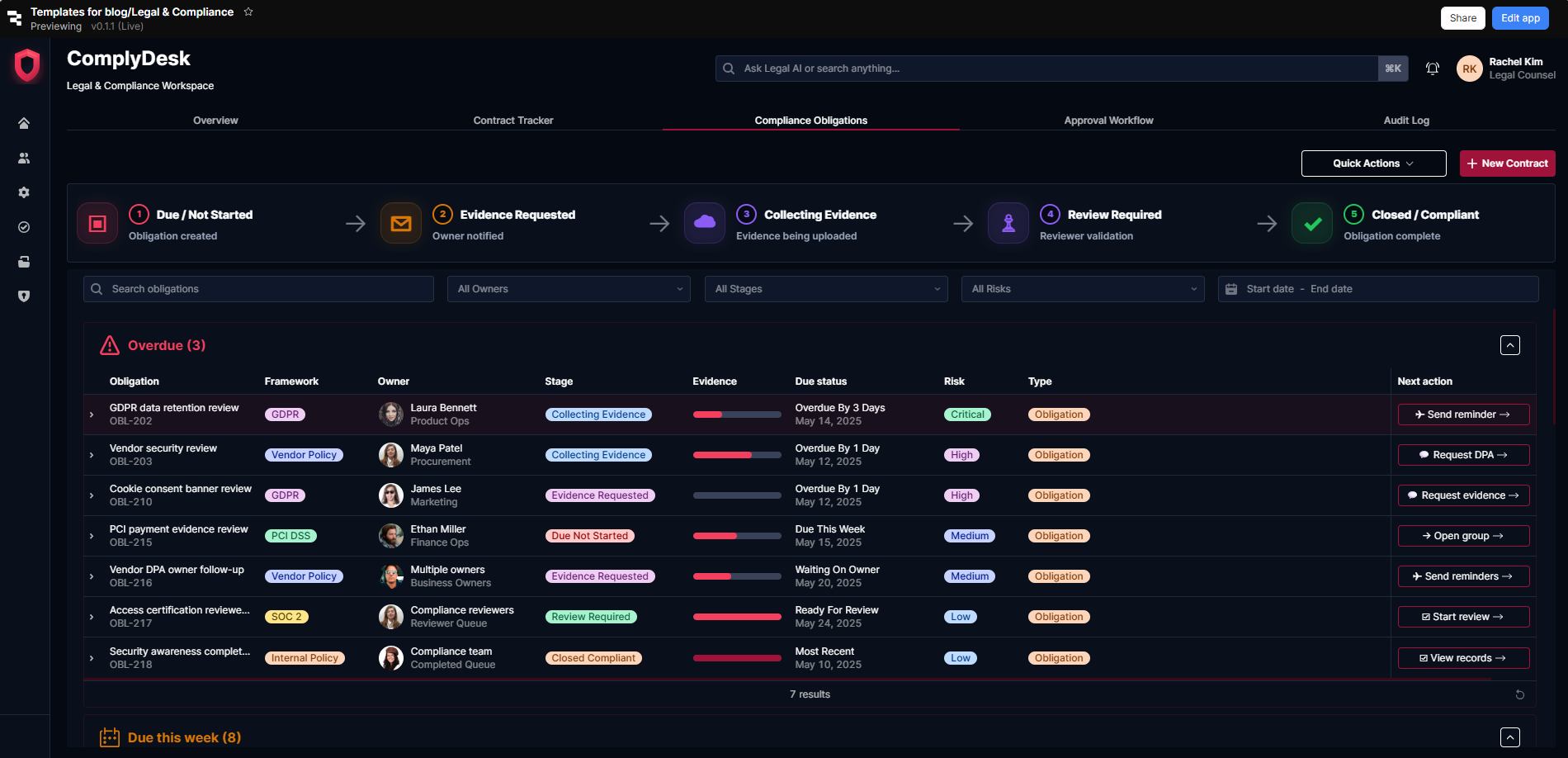
Compliance obligations are only manageable when they're visible - who owns them, where they sit in the evidence collection process, and what's overdue. This tab illustrates how a team might design a structured obligations tracker built around a clear five-stage workflow: due/not started → evidence requested → collecting evidence → review required → closed/compliant.
Each obligation shows the framework it belongs to - GDPR, PCI DSS, SOC 2, Vendor Policy - alongside the owner, current stage, evidence progress, due status, risk level, and a recommended next action. Overdue items are grouped at the top; due this week below that. Filters by owner, stage, risk, and date range let the team cut to whatever subset needs attention.
For compliance teams managing multiple frameworks simultaneously, this kind of structured view is the difference between staying on top of obligations and finding out something is overdue when an auditor asks.
Approval Workflow: a clear, documented path from submission to sign-off
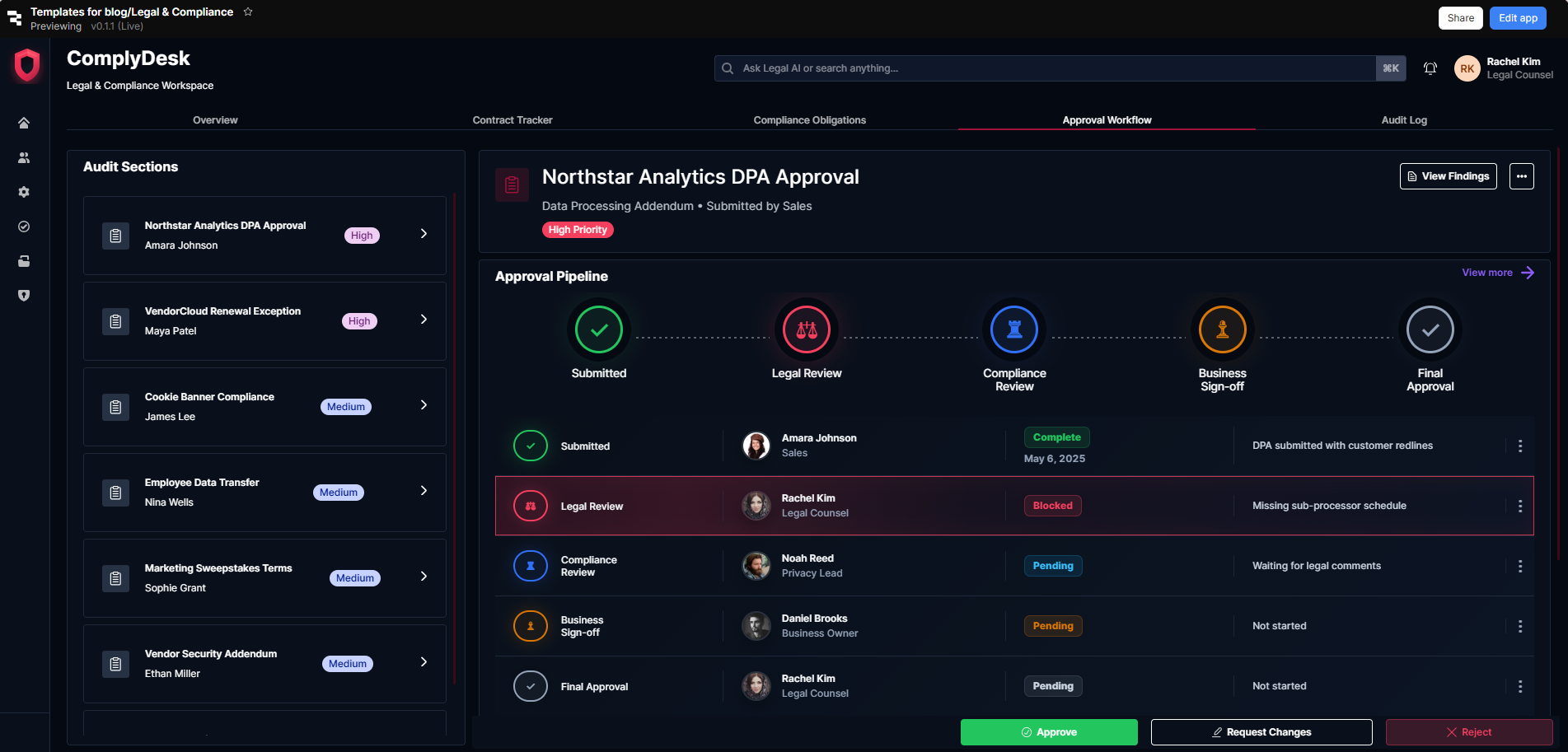
Legal approvals that happen informally leave no trail - and no trail means no defence when something is later questioned. This tab shows one way to design a structured approval workflow that makes every stage visible, every decision documented, and every blockage easy to spot.
A list of items pending approval sits on the left, each with priority and owner. Selecting an item opens a full approval pipeline view: submitted → legal review → compliance review → business sign-off → final approval, with each stage showing the responsible person, current status, and any notes. Blocked stages are highlighted with a reason - missing sub-processor schedule, waiting for legal comments - so whoever needs to act knows exactly what's required.
We'd recommend mapping your own approval stages and sign-off authorities carefully when building this out - the structure will vary significantly depending on whether you're approving vendor contracts, DPAs, or internal policy changes.
Audit Log: a complete, filterable record of every action
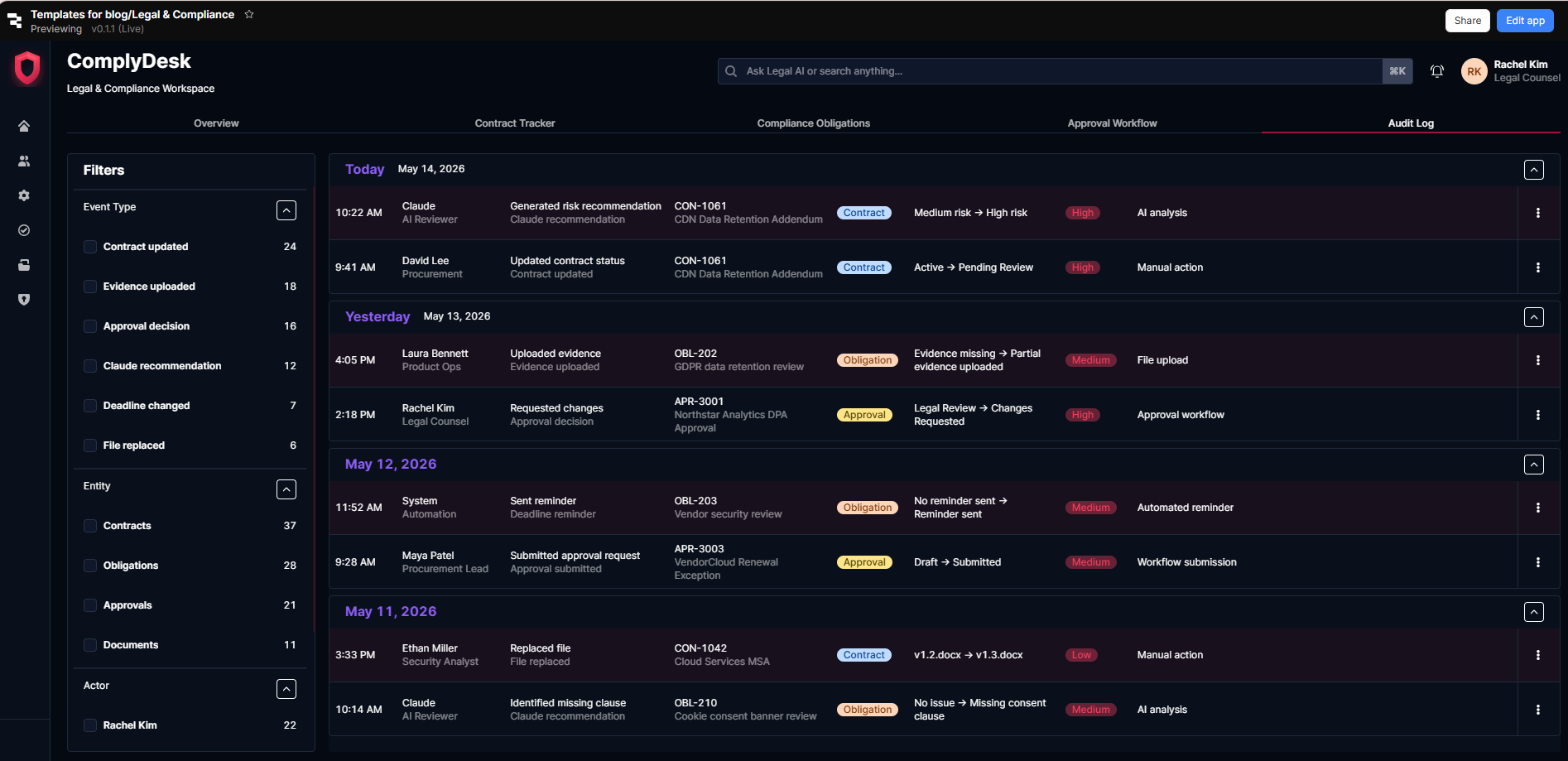
When an auditor asks what happened, when, and who authorised it, the answer needs to be immediate and complete. This tab illustrates how a team might design a chronological audit log that captures every action across contracts, obligations, approvals, and documents - including AI-generated recommendations - in one searchable, filterable record.
Each entry shows the timestamp, actor, action taken, item reference, entity type, status change, risk level, and whether the action was manual or AI-assisted. Filters by event type, entity, actor, and date range make it easy to pull the specific evidence an auditor or regulator needs without reconstructing a timeline from email threads and shared drives.
For legal and compliance teams operating in regulated industries, this tab alone may be reason enough to build the tool.
Download the template and get building ⬇️
Legal and compliance risk rarely announces itself. It accumulates quietly - in contracts nobody reviewed, obligations nobody chased, approvals nobody documented. This template is a starting point for building the kind of tool that keeps all of that visible before it becomes a problem, with AI doing the heavy lifting on risk analysis so your team can focus on the decisions that actually require legal judgment.
