


Time saving is often the justification for incorporating computation. In the digital humanities, computational tools allow analysis of thousands of texts in a matter of minutes. Artificial intelligence tools have improved these workflows, creating in-depth models of natural language texts of a quality largely unseen in the last two decades of computational research.
The question remains, though: if a researcher is only working with a handful of texts, why the need to bring in computational tools at all?
A Project to Test the Waters
To explore this question, University of Michigan PhD student James Hunt Smith worked with Bold Tech's Mitchel Smith to integrate AI tools into an ongoing digital humanities project. James' project, Feeling Narrative: A Sentiment Analysis of Queer-Themed Spanish Picturebooks, had two driving research questions: 'What sentiment arcs exist in these texts?' and 'What do digital humanities methods provide for the analysis of small, dense datasets?'. Within this project, James had three concrete goals. First, he wanted to transcribe a set of Spanish picture books to make the text machine-readable. Second, he needed to annotate that text, tagging its major features. Third, he wanted to use those annotations to analyse the books themselves.
Together, these three goals served a single purpose: to transform the picture books from static physical objects into structured, searchable data - making them open to computational analysis.
James had completed similar projects before, but the existing tools for this work are expensive and clunky. They also struggle with the format of a picture book, which isn't designed to be read by a computer. James needed a tool that could handle text in multiple languages and convert the words embedded in illustrations into readable, editable text.
A human could do this work. James has done this work before. But automating the process would certainly make his life a whole lot easier. This is where Mitchel from Bold Tech came in.
The App
To get the project off the ground, Mitchel began by developing an MCP App with the core functionality the project needed: transcription, annotation, and analysis. The app was easy to use, even with James’s relative lack of digital tool experience, because it made it possible for him to interact with the data in plain English.
How it worked:
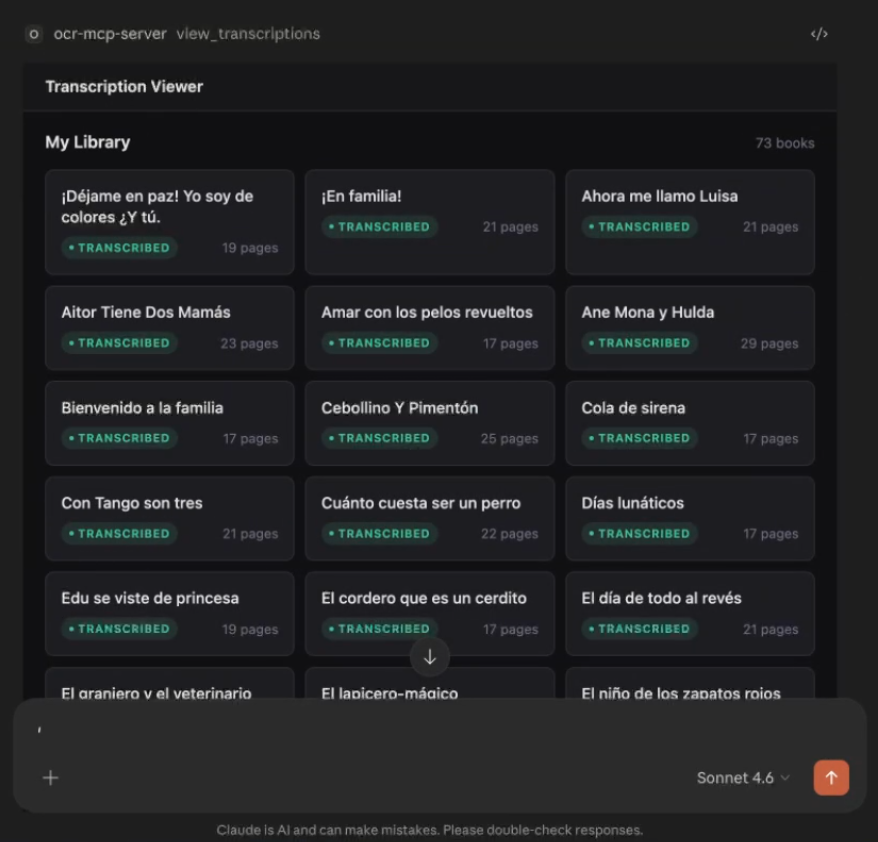
First, James would send a query to the MCP client. In practice, this meant using Claude Desktop to ask something like “Show me the transcription of Con Tango son Tres.” Claude would determine which tool could answer the request based on the query intent and pass it to the MCP server. The server would then locate the transcription, pull the relevant pages, and return them as a packaged response for Claude Desktop. What James would see, and all he wanted to see, was the transcribed book.
The challenge of designing a UI that makes sense
The MCP App was quick to build and served as an effective proof of concept. It also maintained the security of the data, much of which is under copyright. But the UI of the MCP App created some issues. There was a large blank space at the bottom of the rendered data, and each render scrolled the user to the bottom of the list. What was even more limiting was that James wanted to chunk the data in various ways throughout the project, but it was difficult to build the UI for this process within the MCP app’s constraints. It was easy to transcribe the books, but the UI made it confusing to alter the transcription’s pagination without retranscribing the whole text. While these were mostly minor frustrations, they were ones that ultimately pushed them to migrate to a more mature framework: a small React App.
Customization was key
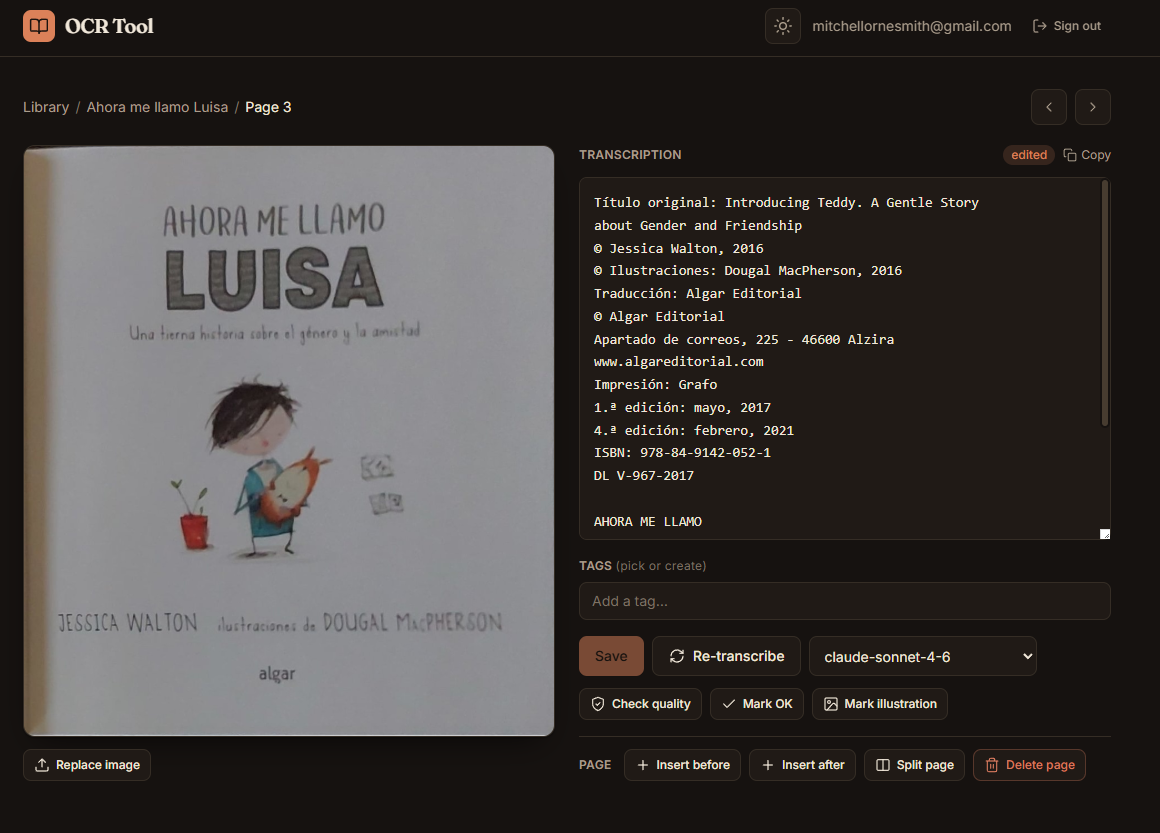
The React app still made use of the MCP server, but it allowed Mitchel to develop a fully custom UI, one that James could access through a web browser. This customization was key as James actually began using the tool at scale. With React as the framework, Mitchel and James were able to make exactly the app they needed. Development time went into making a custom tool perfect for the project rather than a more generic one that was just good enough.
Many of the features were driven by James’s needs as a researcher. For example, transcription correction and text coding was made easier when Mitchel updated the app to render the illustrations side-by-side with the transcribed text.
The React app also makes use of the Claude API to generate interactive graphs. Select a book below to see how its sentiment shifts page-by-page across three dimensions: diversity, joy, and narrative complexity.
Sentiment arcs across book pages
Select a book to see how emotional dimensions evolve from beginning to end.
How to read this chart:
Blue = Celebrates diversity. Orange = Joyful tone. Green = Narrative complexity. Early pages show the opening, later pages show resolution. Dips indicate conflict or sadness; peaks show growth or celebration.
Considering cost
While research needs and questions drove the project, cost was of course a consideration. James operates on a student-researcher’s budget of tens of dollars, not thousands. To work within these constraints, Mitchel made use of cost saving strategies where appropriate. For transcriptions, he used Batch API, a strategy that comes with 50% cost savings. While this results in a slower transcription speed – within 24 hours rather than instantly – the ability to do the work inexpensively is necessary.
Picture books, though, are complicated. The less expensive, budget-friendly models produced inaccuracies in transcriptions. These inaccuracies ranged from missing accents on Spanish letters and mistranscribed punctuation to complete hallucinations or text from facing pages being merged into a single continuous line. To manage this, Mitchel included a button that allows for custom re-transcription, where James could choose a more advanced model for individual books or pages.
Scalability and iterability were at the heart of the development. More books are published every day, and analyses change and grow over the course of a project. While the app was immediately implemented, it continues to improve with use and testing.
Bold Tech x the Ivory Tower: Next Steps
With the deployment of version one of this app, the project is gaining momentum. Largely this means a return to a key question driving James’s research: What is the role of digital tools in projects dealing with small data sets? In September, Mitchel and James will present their work in progress at Baylor University’s Digital Humanities Symposium. Their presentation will outline this App as well as discuss how collaboration between corporate (Mitchel/BoldTech) and academic (James) interests facilitated the creation of a tool with applications wider than either stakeholder had originally envisioned.
Working with Mitchel, and BoldTech, for this project pushed it further than I would have been able to take it myself. The constant feedback loop Mitchel created, one that emphasized flexibility and allowed the app to adapt to my shifting needs, meshed well with my own research process. I certainly learned about digital tools during this work. But mostly I gained a new appreciation for the value of tech experts when working with new technology. My training is in “figure it out.” With BoldTech, I could spend my time figuring out new data instead of bashing my head against the keyboard to get a computer app working.
James Hunt Smith, PhD student at the University of Michigan

