


Running day-to-day operations means staying on top of a lot of moving parts - active sessions, background jobs, account health, incidents… and often spread across multiple tools and dashboards. For a BizOps or Marketplace Ops lead, that means constant context-switching, delayed reactions, and a nagging sense that something is about to go wrong before you've even had a chance to spot it.
This is why we built 'OpsPanel': a Retool template designed to bring all of these moving parts into one, centralized workspace. This app template is a blueprint for inspiration, not a finished product - a starting point from which you can build a custom command center tailored to your specific systems, workflows, and escalation paths. And because it's built on Retool, your team can get from template to production-ready tool in a fraction of the time you usually spend on traditional development.
To find out more about Retool, head to our blog, where we have Retool templates, tutorials and other resources, or check out our full What is Retool guide:
 Tools Team
Dashboard: a single view of operational health
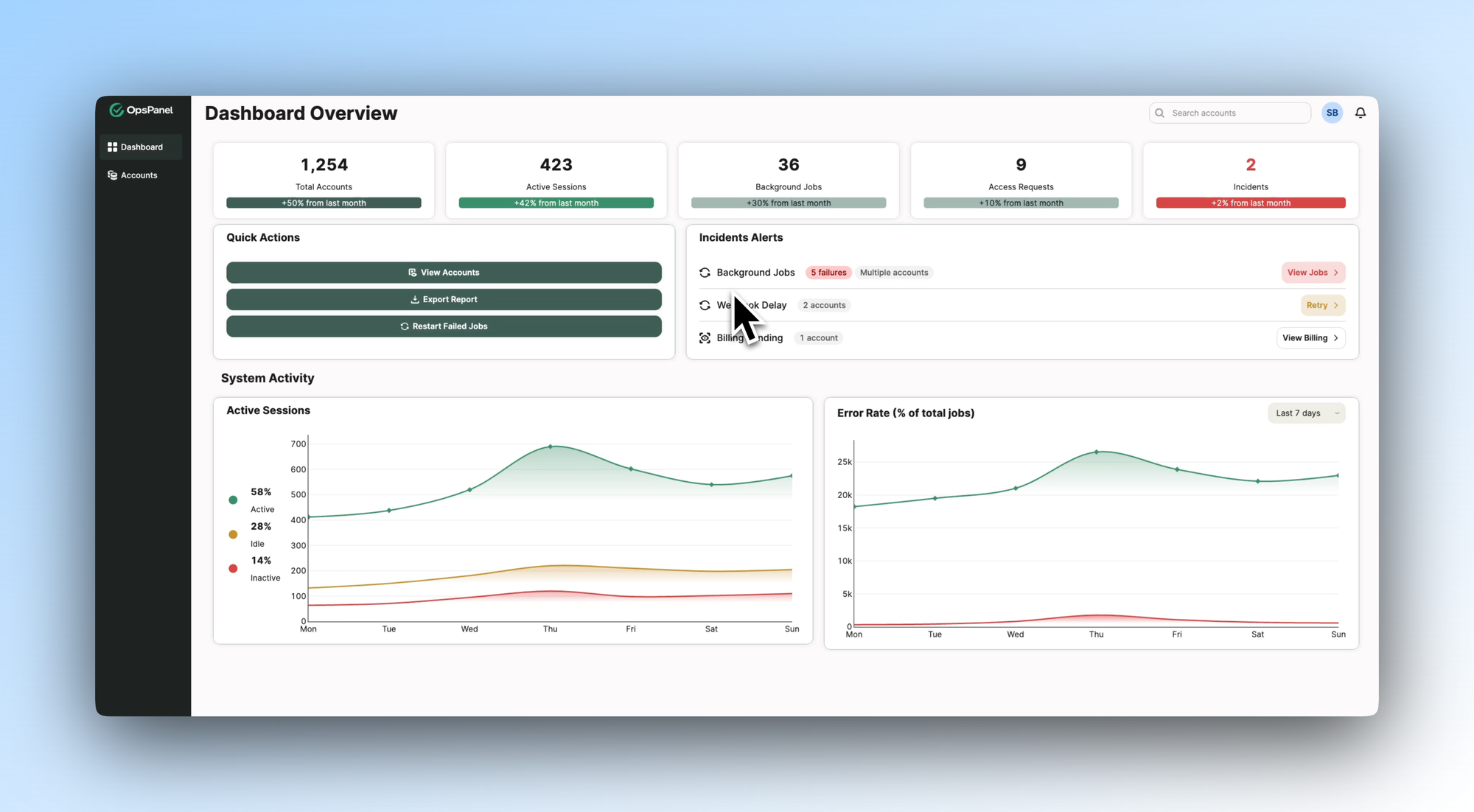
The first thing an ops lead needs to be able to regularly and easily access is a clear picture of what's happening. This dashboard tab shows one way to design that view: a top row of KPI cards covering total accounts, active sessions, background jobs, access requests, and live incidents, each with a month-on-month trend indicator.
An Incident Alerts panel flags what needs immediate attention - background job failures, webhook delays, billing issues - alongside the affected accounts and suggested actions. A Quick Actions panel sits alongside it to easily facilitate the most common tasks: viewing accounts, exporting reports, restarting failed jobs.
Below, System Activity charts track session status and error rates over time, giving ops leads the visibility to catch issues early rather than react after the fact. In your own build, you'd connect these panels to your actual data sources and shape the KPIs around what your team genuinely needs to monitor.
- Education
- Healthcare
- Media
- eCommerce
- Logistics ops
- HR/Recruitment
and more! Sign up for our newsletter to ensure you're always getting access to our free resources.
Accounts: structured visibility across every account
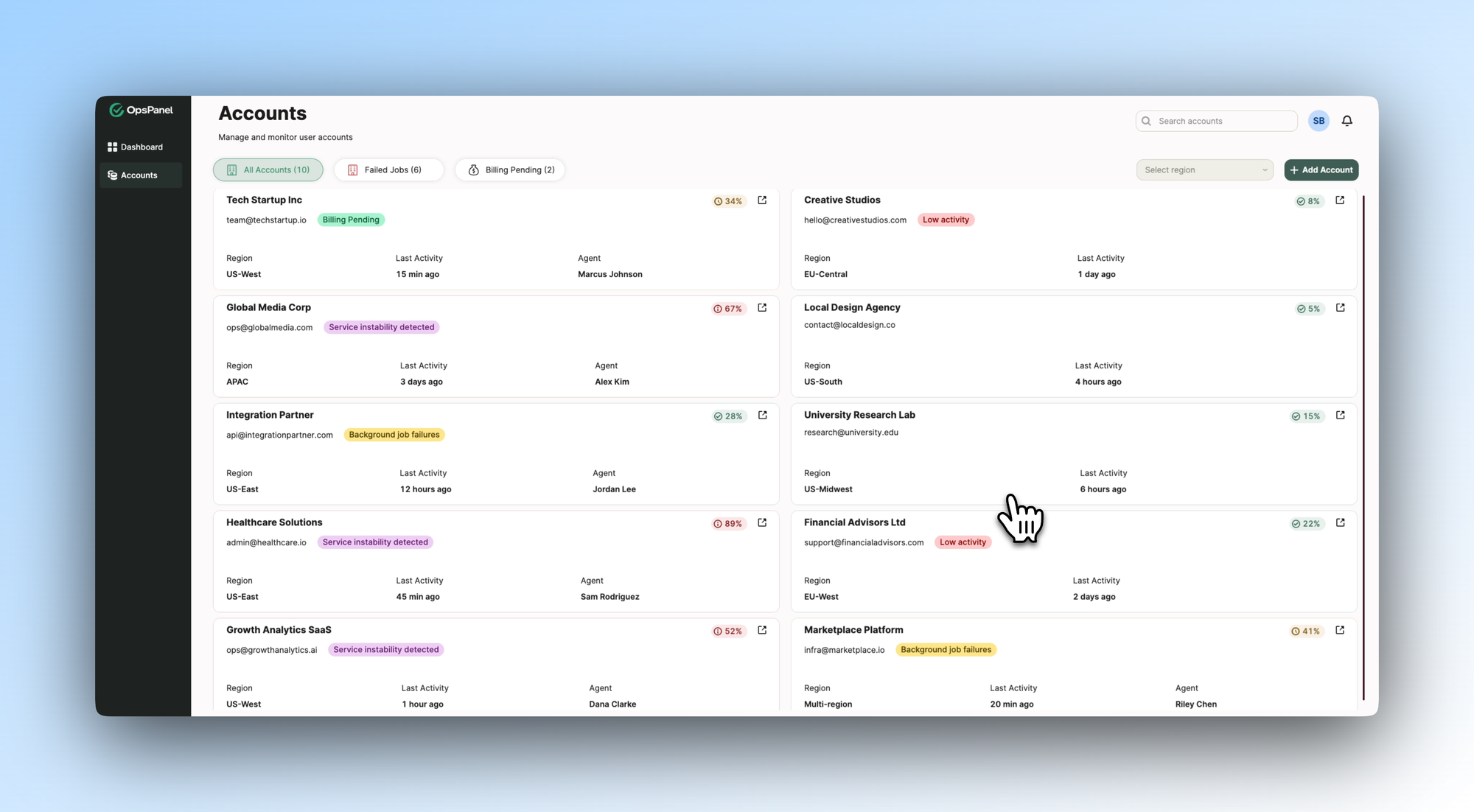
The Accounts tab illustrates how a team might design a clear, filterable view of every account they manage. Status tags - billing pending, service instability detected, background job failures, low activity - surface which accounts need attention, without any manual digging. The headlines, at a glance.
Each account card shows region, last activity, and the assigned agent, making it easy to see not just what's wrong, but who owns it and when it was last touched. Filters for failed jobs and billing pending let teams narrow quickly to what's most urgent.
This kind of design is particularly valuable in high-volume ops environments, where issues can slip through the cracks when there's no clear ownership or status visibility. You could adapt this view to include the account metadata your team actually uses - contract tier, SLA status, escalation history - connected to your CRM or account management system.
Download the template and get building ⬇️
Ops teams rarely fail because they lack data - they fail because the right data isn't in one place when they need it. Bold Tech’s OpsPanel is a template for rethinking that: a practical, adaptable blueprint that shows what a unified ops tool could look like, built on Retool and shaped around how your team actually works.
