


Finance directors are expected to have a clear picture of company finances at all times. In practice, that picture requires a lot of manual graft to assemble: you’re pulling numbers from different systems, chasing approvals over email, and writing the same narrative commentary month after month. And by the time everything is finally all in one place, it's already out of date.
This is a Retool template that shows what a unified finance director's tool could look like - one place to monitor financial health, manage approvals, track invoices, and close the month, with Claude AI woven throughout to flag risks, draft commentary, and surface recommended actions before you've had to ask.
It's a blueprint, not a finished product, and if you’re not a finance director it’s still for you - adapt it to whichever industry you work in. Built on Retool, every part of it can be connected to your actual data sources and adapted to your team's processes. And because Bold Tech builds on Retool, we can get you from template to production-ready in a fraction of the time of traditional development.
Overview: your financial health at a glance
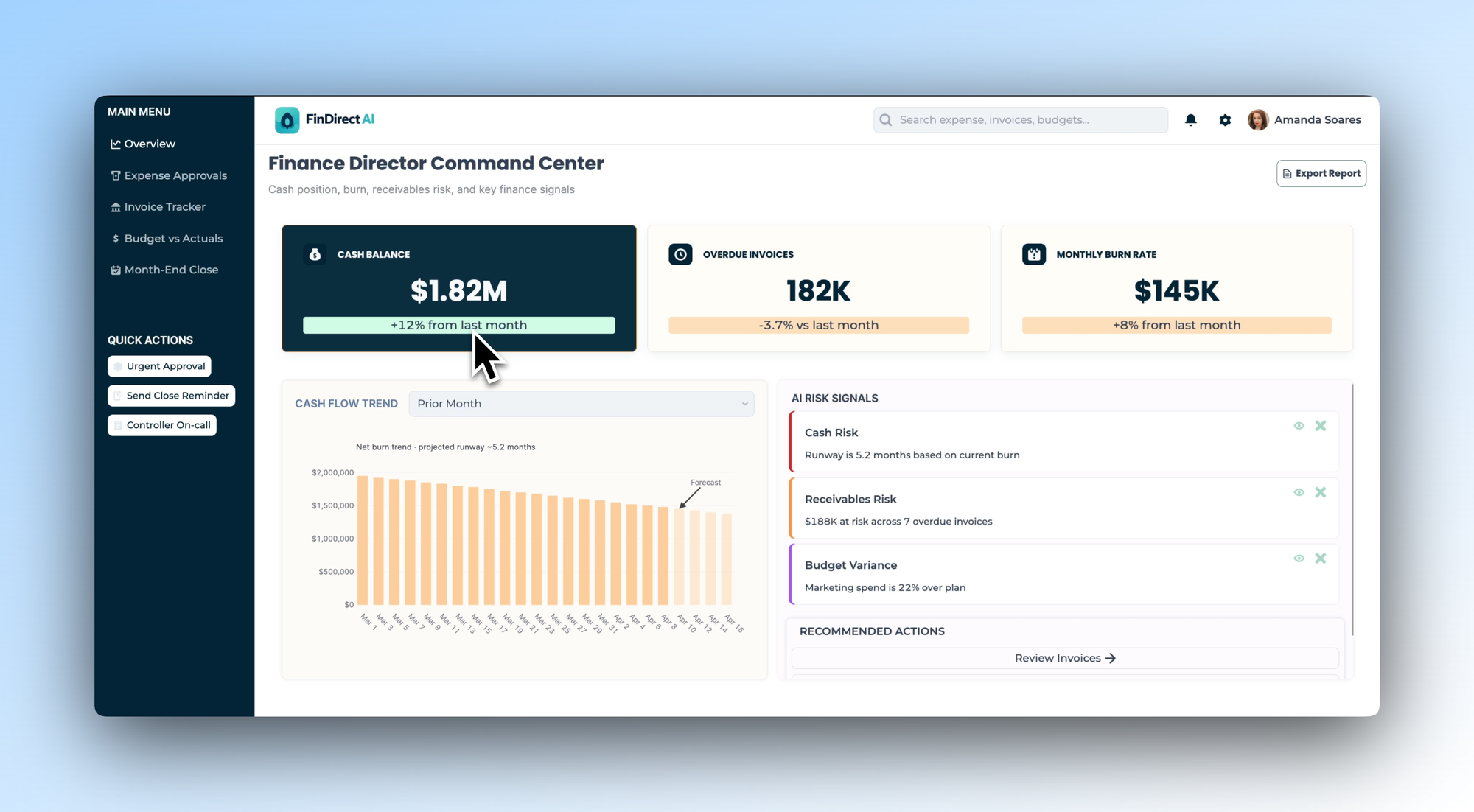
The Overview tab illustrates how a finance director might design their daily starting point. Three headline KPIs - cash balance, overdue invoices, and monthly burn rate - sit at the top with month-on-month trend indicators, giving an immediate read on the numbers that matter most.
Below that, a cash flow trend chart shows net burn against projected runway, with a forecast line extending forward. Alongside it, an AI Risk Signals panel surfaces the issues that need attention: cash runway, receivables risk, budget variance - each with a plain-language summary and a recommended action. No digging required.
In your own build, you could connect this to your accounting system and cash management tools, and configure the risk signals around the financial thresholds that matter to your business.
To find out more about Retool, head to our blog, where we have Retool templates, tutorials and other resources, or check out our full What is Retool guide:
 Tools Team
Expense Approvals: AI-assisted decisions before a human reviews
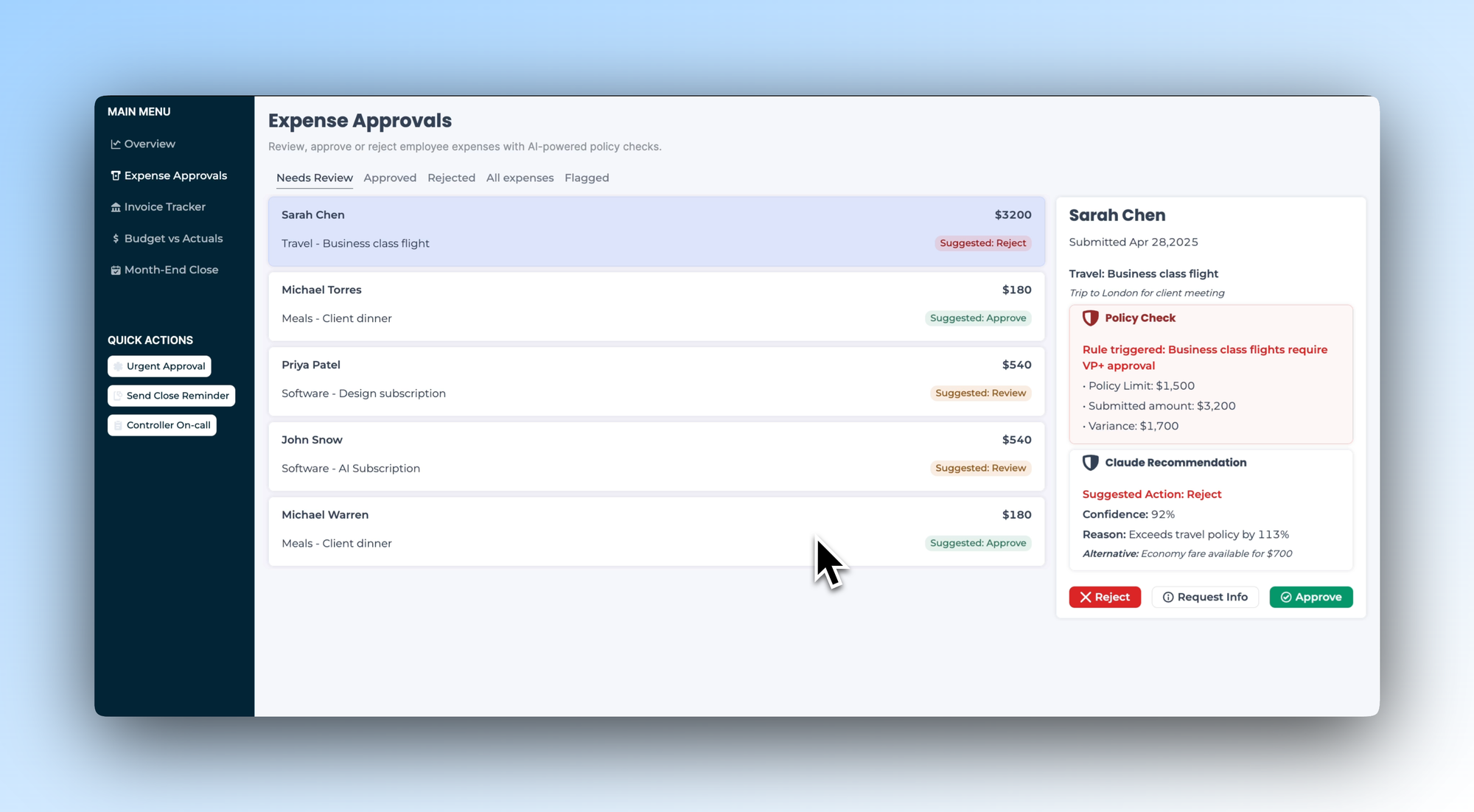
Expense approvals are one of the most time-consuming and error-prone parts of a finance director's week - especially when policy checks happen manually, after the fact. This tab shows one way to design a smarter approval queue.
Each submission is pre-assessed by Claude before the reviewer opens it. A suggested approve, reject, or review recommendation sits alongside each line item, with a confidence score and plain-language reasoning: "Exceeds travel policy by 113%, economy fare available for $700." The policy check flags which rule was triggered and what the variance is. The finance director can approve, reject, or request more information in one click - in short, you can easily take action, informed by the data.
You'd configure this with your own expense policies and approval thresholds, and connect it to whatever system your team uses to submit expenses.
Invoice Tracker: outstanding balances with AI collection insight
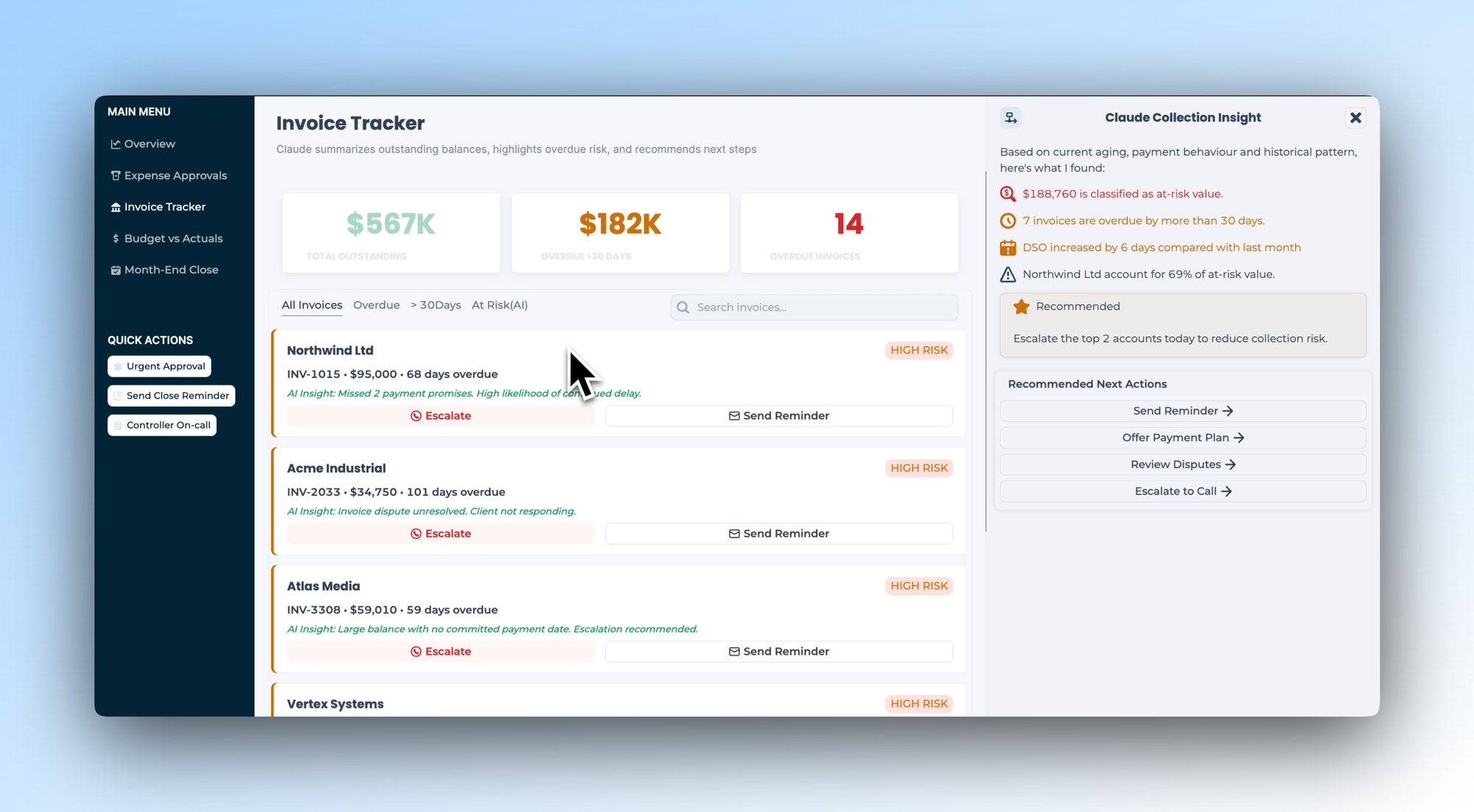
The Invoice Tracker tab shows how a team might design visibility into outstanding receivables, with Claude surfacing the risk picture rather than leaving the finance director to piece it together. Three KPI cards show total outstanding, overdue by more than 30 days, and total overdue invoice count.
Each invoice in the list carries an AI insight - "Missed 2 payment promises. High likelihood of continued delay." - so the reviewer knows the history before taking action. A Claude Collection Insight panel on the right summarises the at-risk value, flags the accounts driving the most exposure, and recommends next steps: send a reminder, offer a payment plan, escalate to a call.
In your own build, you could connect this to your invoicing or ERP system and define the risk criteria and escalation paths that reflect your collections process.
- Education
- Healthcare
- Media
- eCommerce
- Logistics ops
- HR/Recruitment
and more! Sign up for our newsletter to ensure you're always getting access to our free resources.
Budget vs Actuals: the numbers and the narrative, together
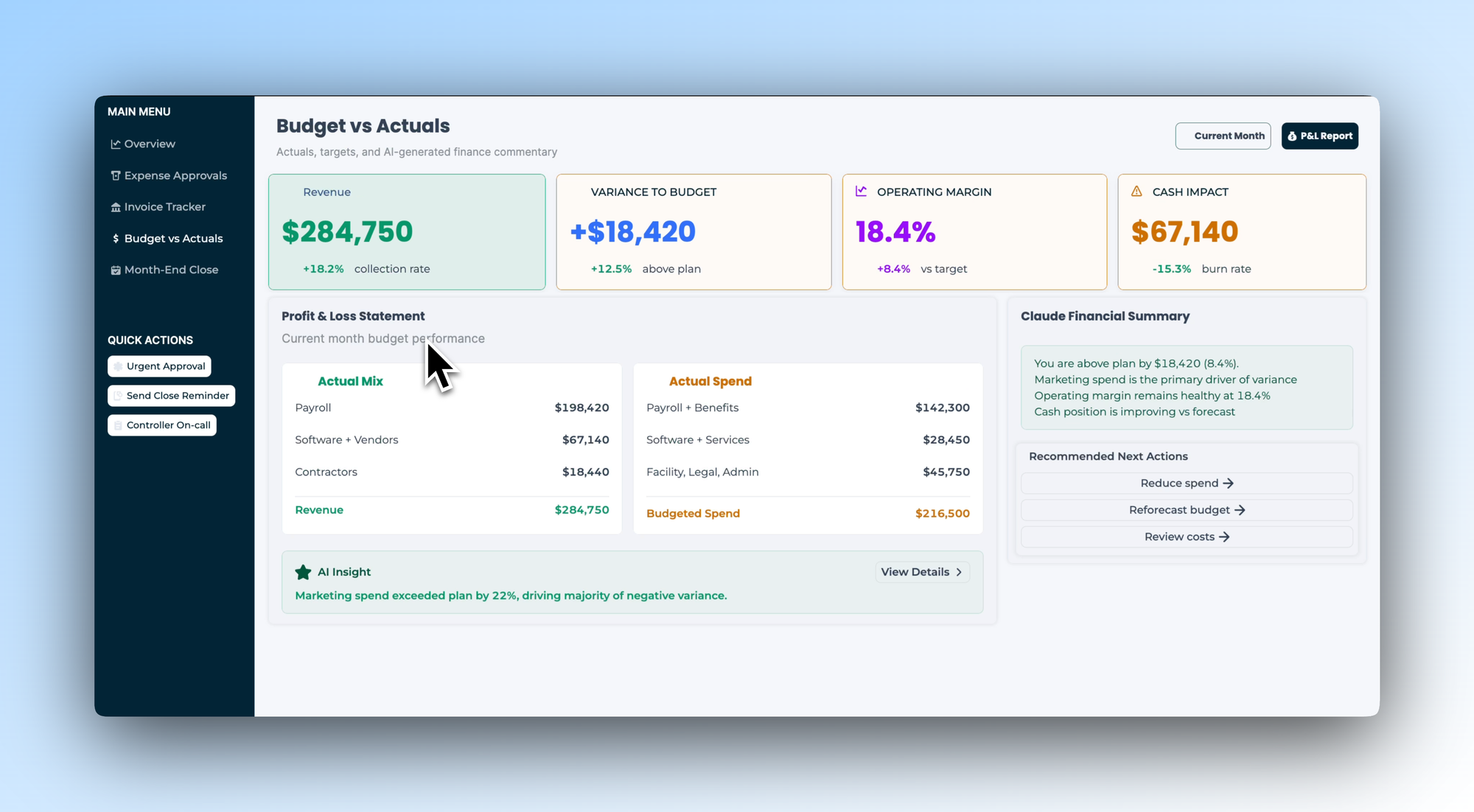
Budget vs actuals reporting is where finance directors spend a disproportionate amount of time - not because the numbers are hard to find, but because turning them into a coherent story takes effort. This tab shows one way to design that view so the story writes itself.
Four KPI cards cover revenue, variance to budget, operating margin, and cash impact. A Profit & Loss Statement breaks down actual mix and actual spend by category. And a Claude Financial Summary panel on the right drafts the commentary: what's driving variance, where margin stands, how cash position is tracking - in plain language, ready to share.
You'd connect this to your finance data and configure the P&L categories and variance thresholds to match how your business reports.
Month-End Close: track every task, catch every risk
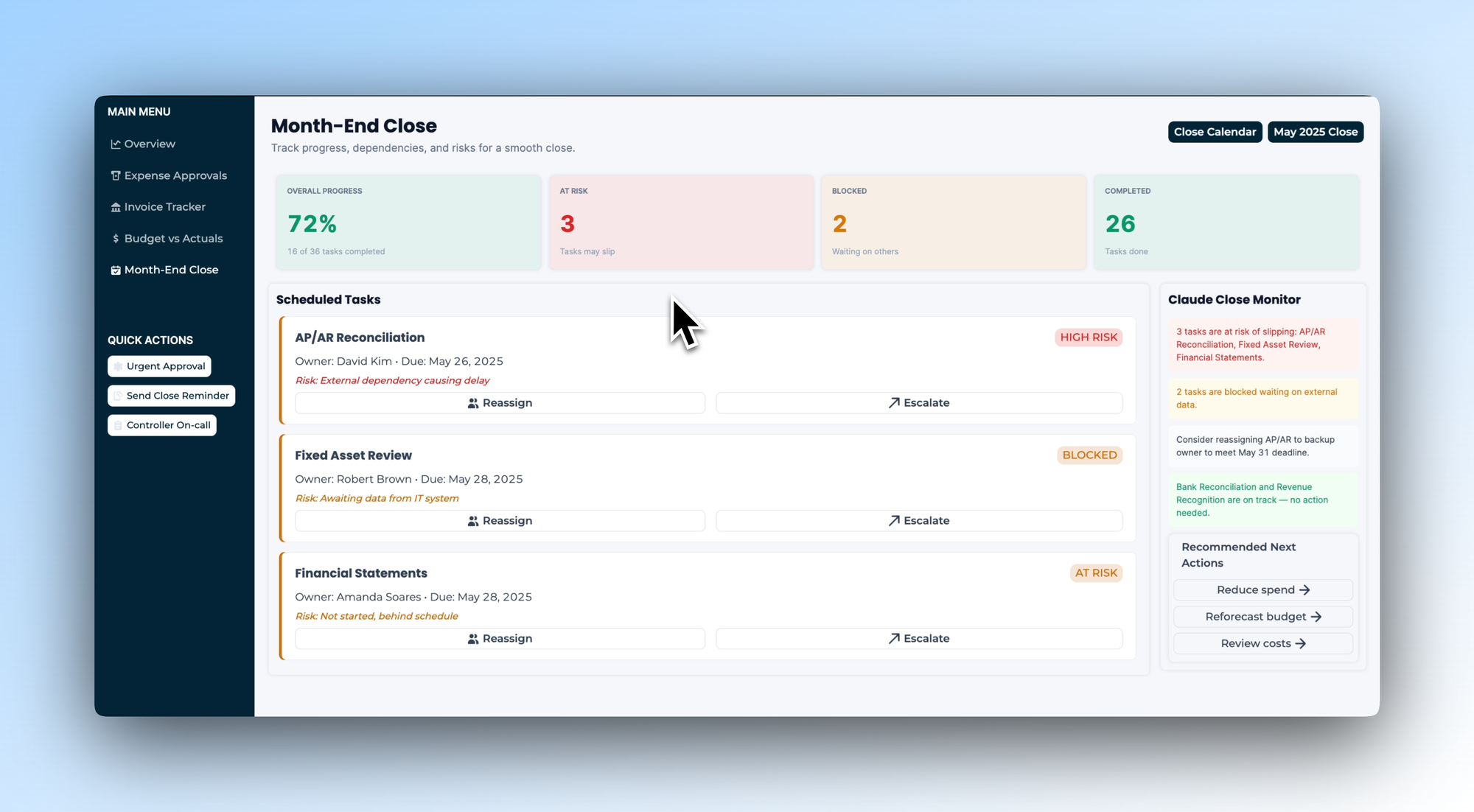
Month-end close is one of the most stressful periods in the finance calendar - not because the work is unclear, but because there's rarely a good way to see what's on track, what's blocked, and what's about to slip until it's too late. This tab illustrates how that process could be managed as a structured, visible workflow.
Four status cards show overall progress, tasks at risk, blocked items, and completed tasks. Remove the stress of the month-end by giving yourself visibility. Each scheduled task shows its owner, due date, and current risk status - with Claude flagging which tasks are in danger of slipping and why. A Claude Close Monitor panel on the right summarises the overall picture and recommends specific actions: reassign a task, escalate a dependency, send a close reminder.
In your own build, we’d recommend you define your own close checklist, map task owners, and connect it to the systems where close dependencies live.
Download the template and get building ⬇️
Finance directors don't lack information - they lack time to process it. This template is inspiration for how you can change that: a practical, adaptable starting point that shows what a unified finance tool could look like, with AI handling the analysis so you can focus on the decisions. Built on Retool and shaped around how finance teams actually work.
