


CS and CX teams sit at the heart of any customer-facing business. Customer Success is proactive: making sure customers get value, expanding accounts, and reducing churn. Customer Experience and Customer Support are reactive: handling inbound issues, resolving problems, answering questions. Both functions share the same underlying challenge - they generate enormous amounts of data about the customers they serve, and most of it ends up siloed, scattered, or ignored.
The problems facing these teams cluster into two groups. On the people side: fragmentation, repetitive manual work, and tooling that was clearly designed by people who don't handle support tickets. On the systems side: rigid workflows that fall apart at edge cases, poor visibility for team leads, and customer data that tells a different story depending on which tool you're looking at. The result is slower resolution times, inconsistent customer experiences, and agents who burn out.
This is why we built this Customer Operations Hub: a Retool template that shows what a unified CS and CX tool could look like - ticketing, playbooks, proactive messaging, and onboarding management in one place, with AI woven throughout. It's a blueprint for inspiration, not a finished product. Built on Retool, every part of it can be adapted to your team's actual workflows, data sources, and processes.
To find out more about Retool, head to our blog, where we have Retool templates, tutorials and other resources.
Inbox: everything your agents need, in one place
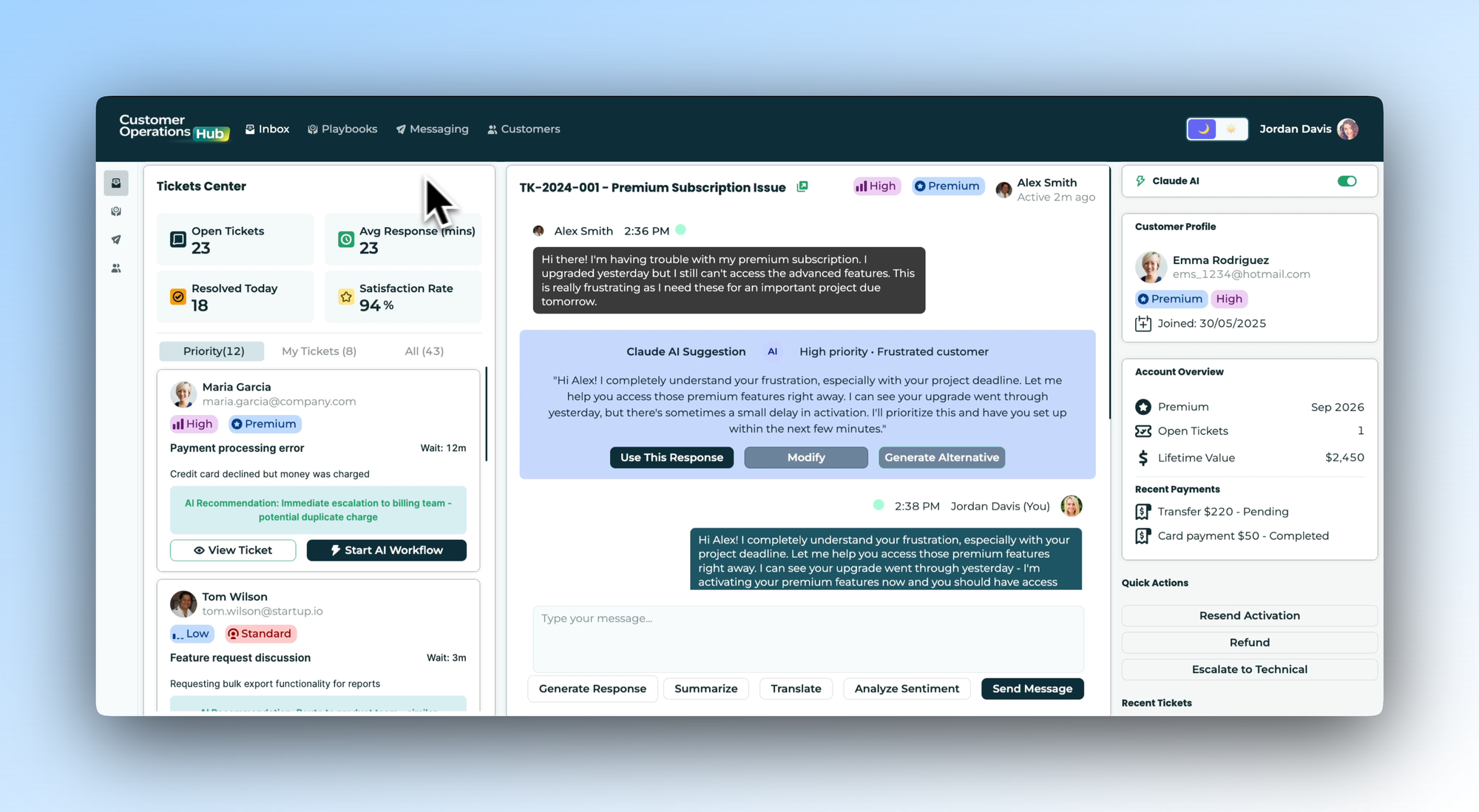
The Inbox tab illustrates how an agent's day-to-day view might be designed. A live stats bar at the top gives an instant read on team health - open tickets, average response time, resolved today, satisfaction rate. Below that, a priority-filtered ticket queue shows each customer's name, tier, issue summary, and wait time, with AI recommendations surfaced beneath each ticket before the agent even opens it.
The main panel is a three-column layout: ticket queue on the left, conversation thread in the centre, and a full customer profile on the right - tier, account value, recent payments, ticket history - so agents aren't starting every interaction cold. A Claude AI suggestion panel reads the open conversation and drafts a contextual response the agent can use, modify, or regenerate. Tools at the bottom of the thread - summarise, translate, analyse sentiment - all sit within the same interface.
In your own build, you'd connect this to your ticketing system and CRM, and configure the AI prompts and quick actions around your team's specific workflows and escalation paths.
- Education
- Healthcare
- Media
- eCommerce
- Logistics ops
- HR/Recruitment
and more! Sign up for our newsletter to ensure you're always getting access to our free resources.
Playbooks: consistency without the rigidity
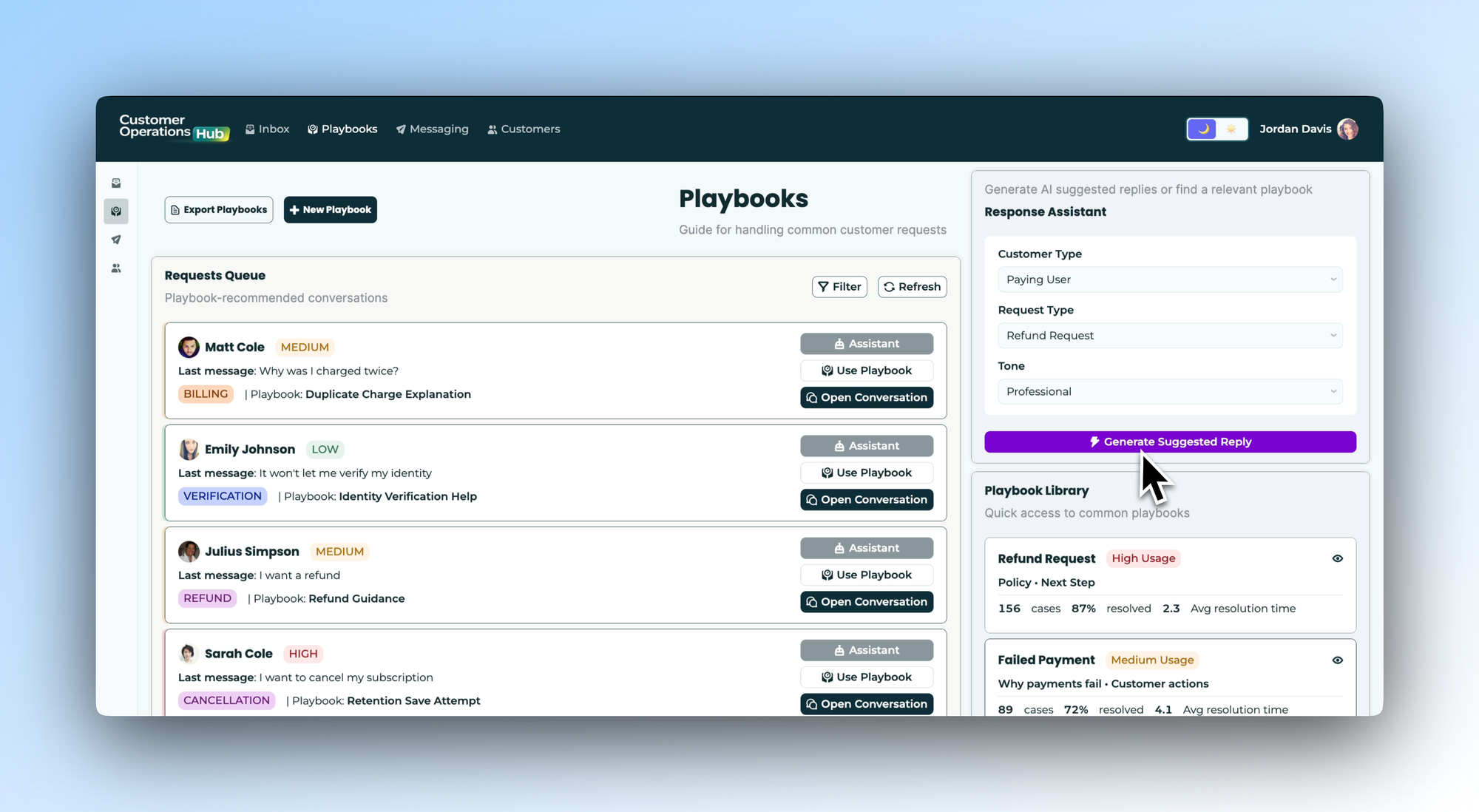
Inconsistency is one of the biggest headaches in CS and CX - two agents handle the same issue type and give completely different answers, because the right approach lives in someone's head or an onboarding doc nobody reads anymore.
The Playbooks tab shows one way to address this. A requests queue automatically matches incoming conversations to the most relevant playbook - a cancellation request surfaces the Retention Save Attempt playbook; a billing question surfaces Duplicate Charge Explanation - before the agent has even opened it. A Playbook Library on the right shows performance data for each framework: cases handled, resolution rate, average resolution time. A Response Assistant panel lets agents generate a tailored AI suggestion by selecting customer type, request type, and tone in seconds.
You'd build this out with the playbooks that reflect your actual issue types and resolution logic, turning your best-performing responses into institutional knowledge the whole team can access.
Messaging: proactive outreach that actually gets used
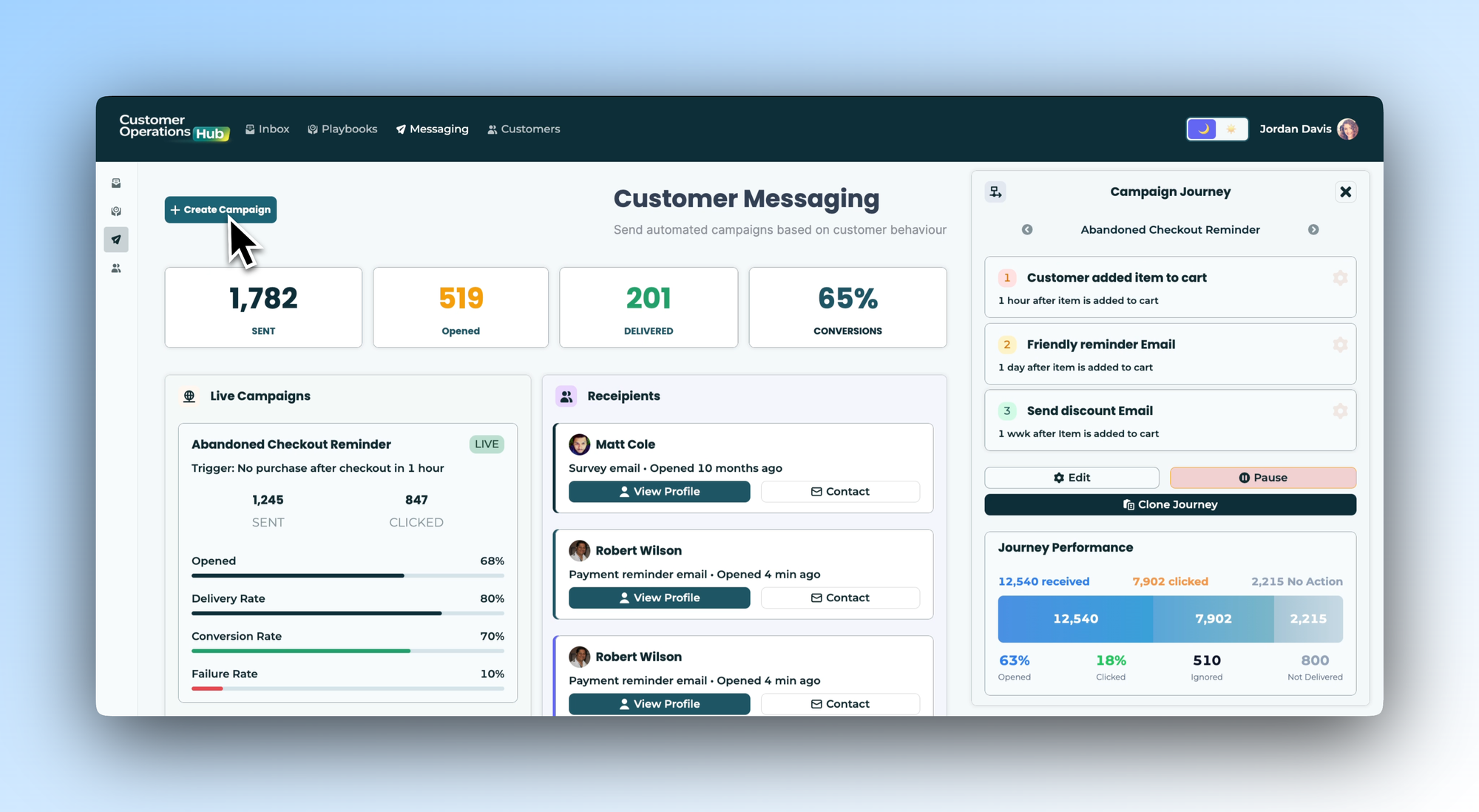
Most support tooling is reactive by design. The Messaging tab shows what a proactive layer could look like - a place where CS teams create and manage automated campaigns triggered by customer behaviour. Think abandoned checkouts, thirty days of inactivity, or a pending payment.
Live campaign cards show the metrics that matter - sends, open rate, delivery rate, conversion rate - without requiring a separate analytics tool. A Campaign Journey panel on the right shows the full sequence for each campaign and its live performance, step by step. A Recipients view lets agents see exactly who is enrolled in which campaign and jump directly to a customer's profile when a personal touch would serve them better than another automated message.
In your own build, you'd define the triggers, timing logic, and messaging that match your customer lifecycle and retention goals.
Customers: onboarding as a managed process
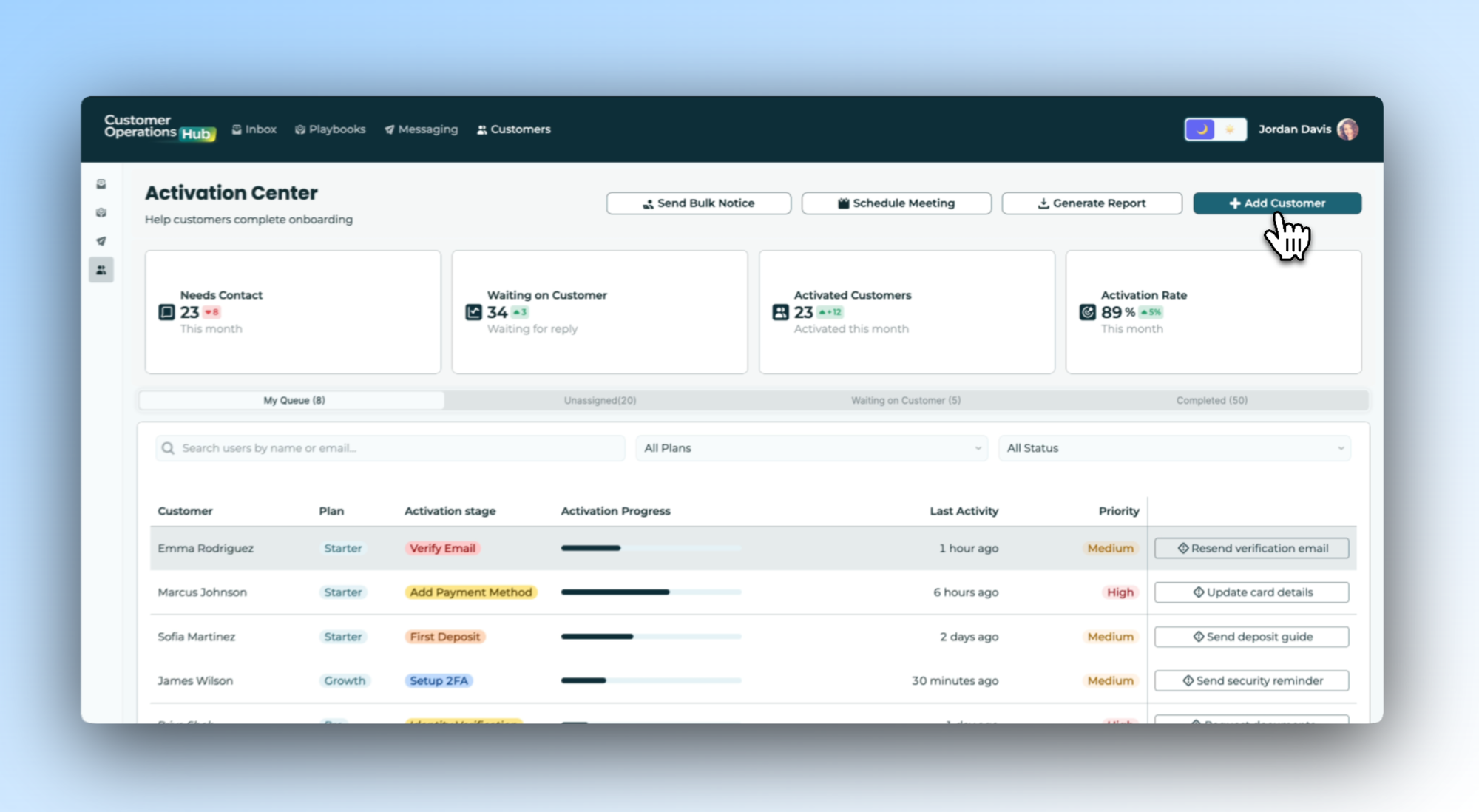
The Customers tab reframes onboarding as something that requires active management, not just a welcome email and a documentation link. The Activation Center gives CS teams a live view of where every new customer sits in the onboarding journey - and more importantly, who is stuck.
Four KPI cards set the context: customers needing contact this month, those waiting on a reply, successfully activated this month, and overall activation rate. Below that, a detailed queue shows every customer in progress: plan, activation stage, progress bar, last activity, priority, and a contextual next-action button. A customer stuck on bank linking gets "Complete setup guide". Someone who missed a welcome call gets "Reschedule call". The right next step is always one click away.
You'd adapt this view to your own onboarding stages and connect it to whatever system holds your customer data, turning activation from something that happens into something that's actively managed.
Download the template and get building ⬇️
CS and CX teams don't fail because they don't care about customers - they fail because their tools make the job harder than it needs to be. This Customer Operations Hub is a template for rethinking that: a practical, adaptable blueprint that shows what a unified customer operations tool could look like, built on Retool with the potential to be shaped around how your team actually works.
