


Accounts payable teams sit at the intersection of vendor relationships, cash flow management, and financial compliance. When the process works, payments go out on time, vendors stay happy, and the books stay clean. When it doesn't - invoices get stuck in approval queues, PO mismatches block payments, disputes drag on unresolved - the knock-on effects ripple across the whole business.
The problem often lies in a lack of structure: invoices coming in from multiple sources, approvals happening over email, vendor risk tracked in spreadsheets, and no single view of what's due, what's blocked, and what needs action today.
This is a Retool template that shows what a structured, AI-assisted accounts payable tool could look like - from invoice intake to vendor management, payment scheduling, and dispute resolution, with Claude surfacing risks and recommended actions throughout. It's a great source of inspiration that can be adapted to meet the needs of your specific context and team, and it’s not limited to finance; you can adapt it as you need. Built on Retool, every part of it can be connected to your actual systems and adapted to your team's processes. Bold Tech can help you get from template to production-ready in a fraction of the time of traditional development.
Want to know a bit more about Retool? We've got plenty of resources on all things Retool: head to our blog, where we have Retool templates, tutorials and other resources, or check out our full What is Retool guide:
 Tools Team
Overview: the full AP picture in one place
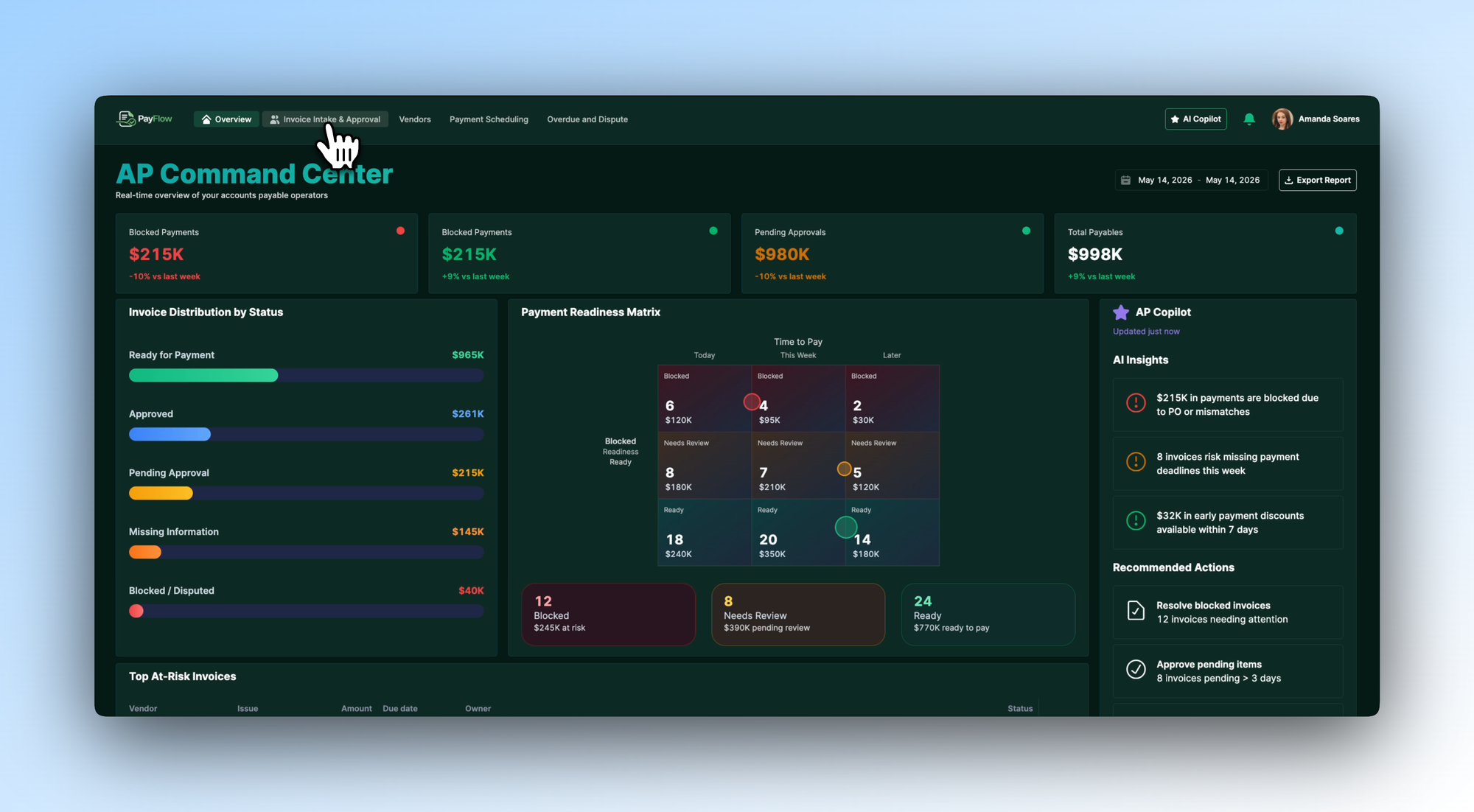
The Overview tab illustrates how an AP team might design their command center. Four KPI cards surface the numbers that matter most - blocked payments, pending approvals, and total payables - each with a week-on-week trend. An Invoice Distribution by Status panel breaks down the full portfolio: ready for payment, approved, pending approval, missing information, and blocked or disputed.
A Payment Readiness Matrix plots invoices by readiness and time to pay, making it immediately clear what needs to move today versus what can wait. An AP Copilot panel on the right surfaces the three most important AI insights - blocked payments due to PO mismatches, invoices at risk of missing deadlines, early payment discounts available - with recommended actions beneath each.
In your own build, we’d recommend you connect this to your ERP or accounting system and configure the risk thresholds and readiness criteria around your payment terms and approval structure.
Invoice Intake & Approval: AI-flagged issues before a human reviews
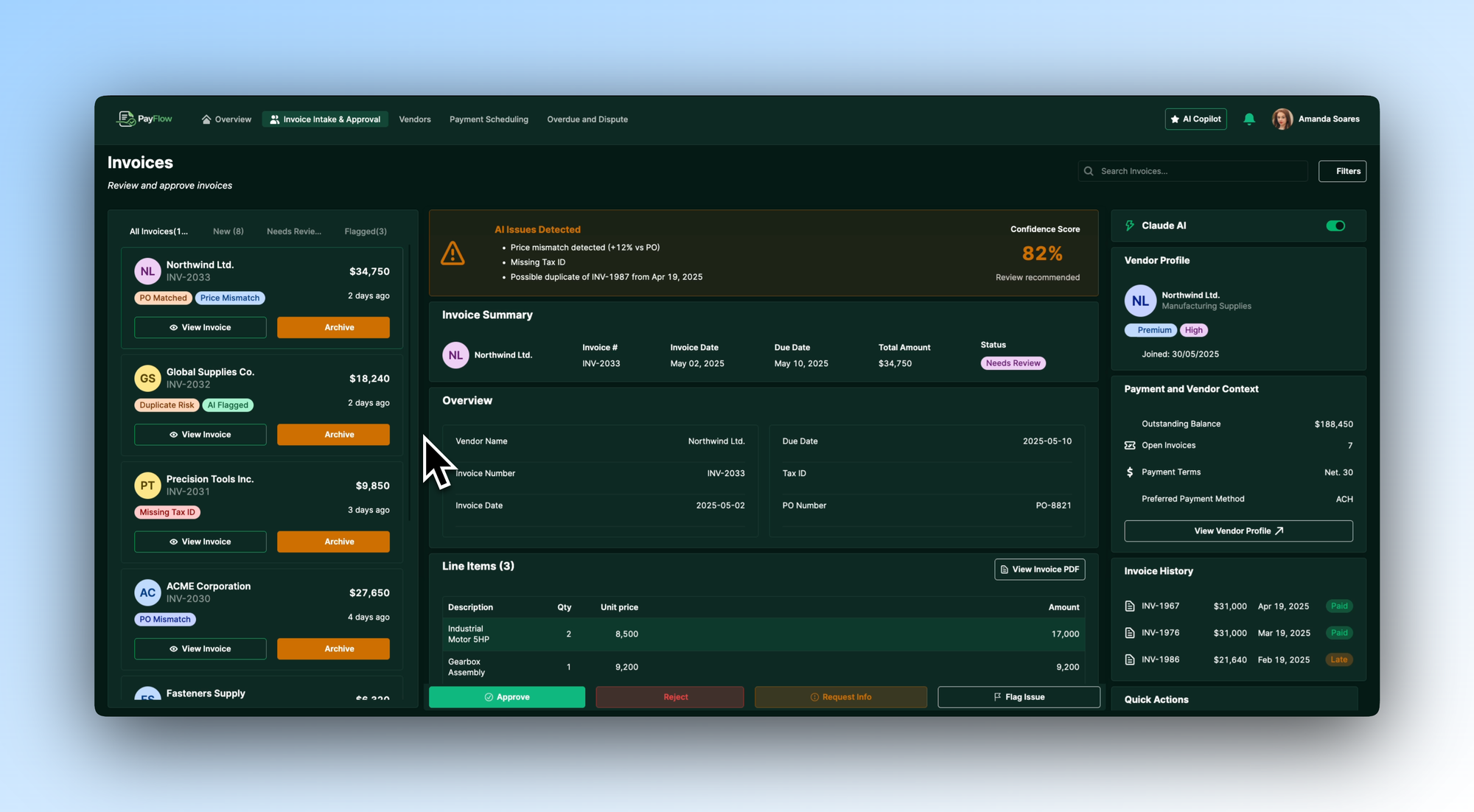
Invoice processing is where most AP bottlenecks start - mismatched PO numbers, missing tax IDs, duplicate submissions - caught late, if at all. This tab shows one way to design an intake queue where Claude flags issues before a reviewer even opens the invoice.
Each invoice in the queue carries AI-generated tags - price mismatch, duplicate risk, missing tax ID, PO mismatch - so reviewers know what they're dealing with at a glance. Opening an invoice surfaces a full AI Issues Detected panel with a confidence score and specific findings, alongside the vendor profile, payment terms, outstanding balance, and invoice history. Approve, reject, request more information, or flag an issue - all from the same view.
You'd configure this with your own validation rules and connect it to your purchase order system so Claude's checks are running against your actual data.
Vendors: full visibility into every supplier relationship
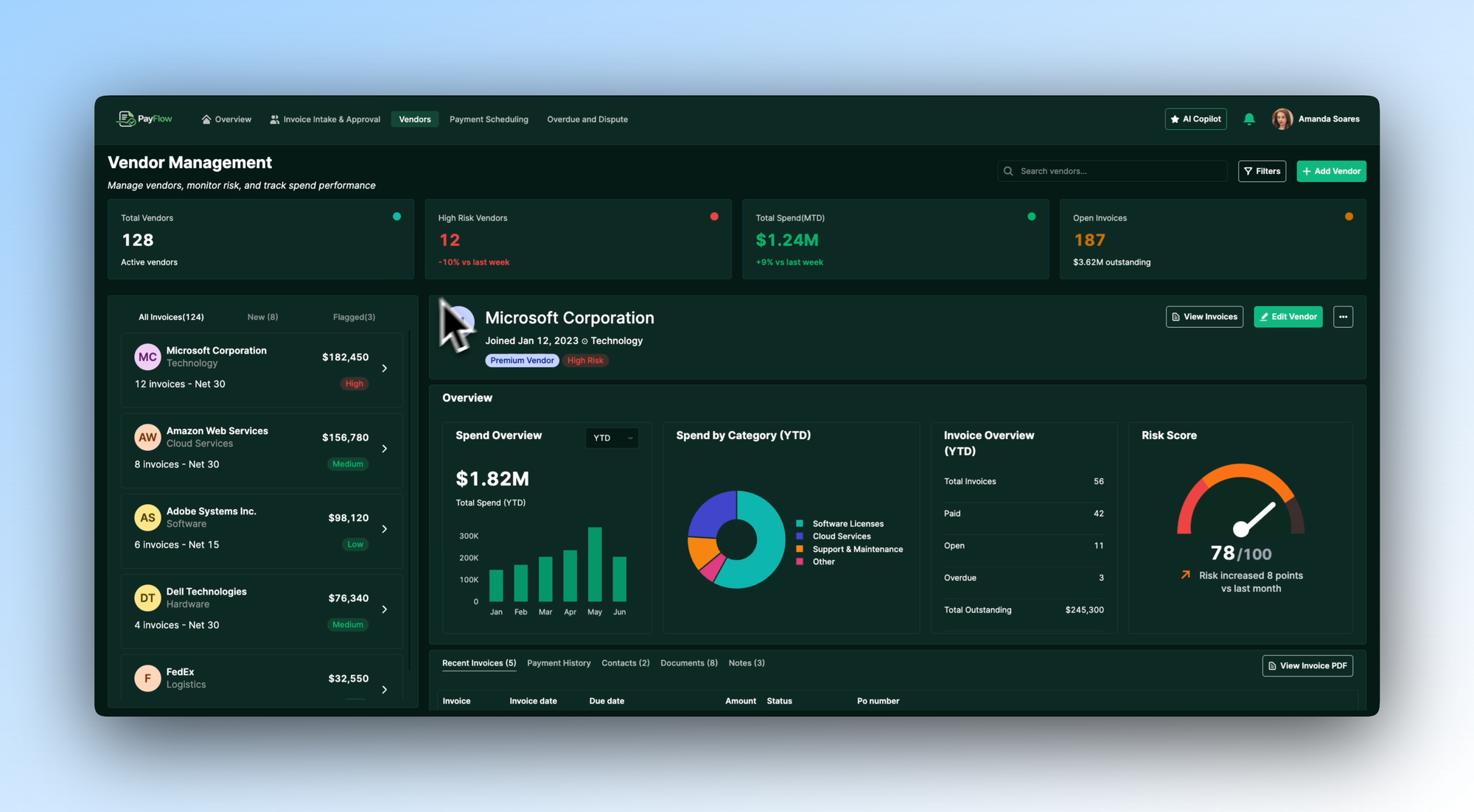
Managing vendor relationships without a centralised view means risk builds up quietly - overdue invoices accumulate, payment terms get missed, and high-spend vendors don't get the attention they warrant. This tab shows how a structured vendor directory could be designed.
A vendor list on the left shows each supplier with their risk rating, outstanding balance, and invoice count. Selecting a vendor opens a full profile: YTD spend overview, spend by category, invoice history broken down by status, and a risk score that updates as payment behaviour changes. Tabs within the profile give access to recent invoices, payment history, contacts, documents, and notes - everything an AP team needs to manage the relationship without switching tools.
In your own build, you could pull vendor data from your existing supplier management system and define the risk scoring logic around your own payment terms and thresholds.
- Education
- Healthcare
- Media
- eCommerce
- Logistics ops
- HR/Recruitment
and more! Sign up for our newsletter to ensure you're always getting access to our free resources.
Payment Scheduling: planned, protected, and AI-advised
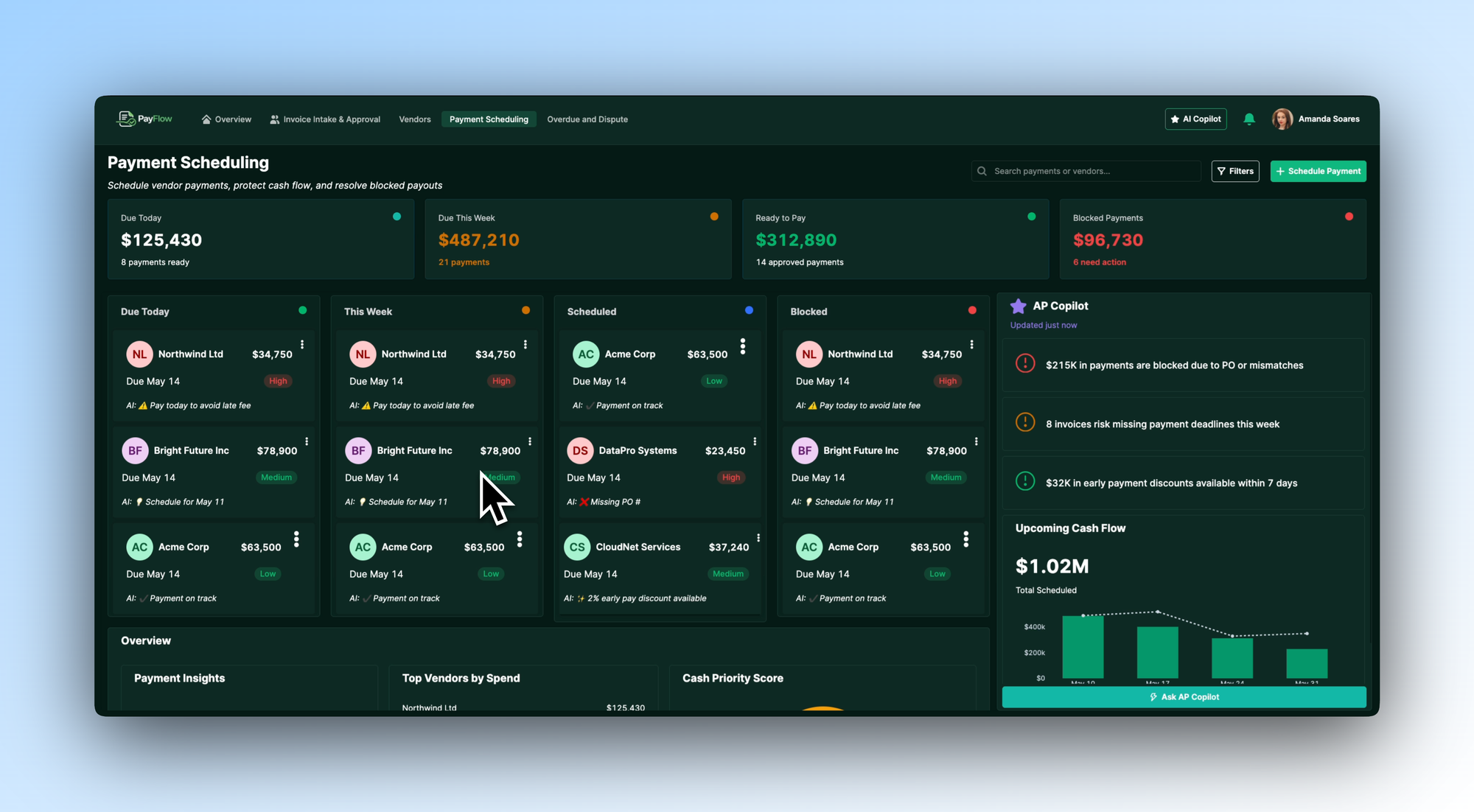
Payment scheduling is where cash flow protection happens - or doesn't. This tab illustrates how a team might design a structured scheduling view that makes priorities clear and flags problems before they become costly.
Four columns organise payments by status: due today, this week, scheduled, and blocked. Each payment card carries an AI note - "Pay today to avoid late fee", "2% early pay discount available", "Missing PO number" - so the AP team knows the implication of each decision without having to investigate. An AP Copilot panel on the right summarises the biggest risks and opportunities across the full payment run, with an upcoming cash flow chart showing total scheduled outflows.
We’d recommend you connect this to your payment system and configure the AI prompts around your early payment discount terms, late fee thresholds, and approval workflows.
Overdue and Disputes: prioritised resolution, not a growing backlog
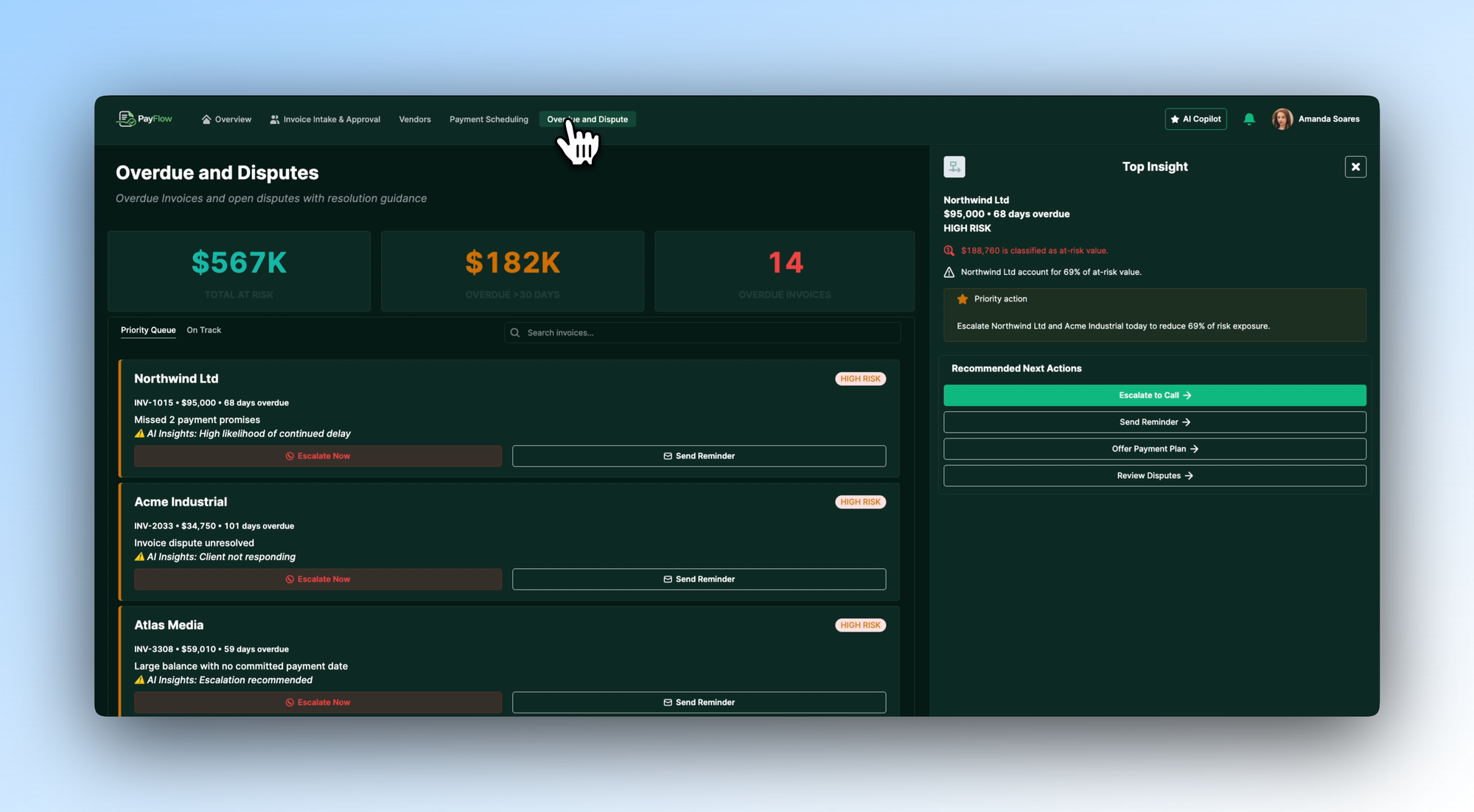
Overdue invoices and unresolved disputes are a slow drain on vendor relationships and cash flow visibility. This tab shows one way to design a structured resolution queue that makes it clear what's most urgent and what to do about it.
Three headline figures set the context: total at risk, overdue by more than 30 days, and total overdue invoice count. A priority queue lists each overdue item with its AI insight - "High likelihood of continued delay", "Client not responding", "Escalation recommended" - so the team can triage quickly. A Top Insight panel on the right identifies the single most impactful action available and surfaces recommended next steps: escalate to a call, send a reminder, offer a payment plan, review the dispute.
In your own build, you'd define escalation paths, connect to your communication tools, and configure the priority logic around your own collections process.
Download the template and get building ⬇️
AP teams don't struggle because the work is unclear - they struggle because the information they need to act on it is never in one place. This template is a blueprint for changing that: a practical, adaptable starting point that shows what a structured AP tool could look like, with AI handling the triage so your team can focus on resolution. Built on Retool and shaped around how accounts payable teams actually work.
